
Is your tablet going off the hook since the BOGO went live? Couriers lining up at the counter? Items running out by 7pm? Error charges creeping up, and you're wondering whether to just turn the promo off?
When I laid out a plan for one store that would take it from about 5 orders a day to about 48, the first risk I put in writing was the kitchen. Aggressive campaigns mean a Dasher every 30 minutes, an order screen going off the hook and stock running out. My rule since then: if the kitchen struggled in month 1, we don't expand. We fix throughput first.
This post covers what to do in the moment (busy mode, pausing, prep time), how to move a promo to the hours you can handle, how to make the promo itself easier to cook, and how to scale in stages.
Quick answers and quick fixes
- Slammed right now? On the DoorDash tablet, set your status to Busy to add prep time, or Pause. In the Uber Eats Orders app, use Busy Mode or pause new orders.
- Paused? Turn it back on. Set a timer on your phone when you pause.
- Thinking of raising prep time for good? Only if couriers are actually waiting on you. You can't solve for 4 seconds of avoidable wait time.
- Promo swamping the dinner rush? Schedule it for slower hours instead of turning it off.
- Error charges climbing? Work out your error rate each week. Under 2% is the line I use. Dispute what wasn't your fault.
- Want more orders? Change one thing at a time: more BOGO items, then more ad spend, with a full month between.
Why can a promo that works end up hurting you?
Because the apps also rank you on how well you fulfill orders. When the kitchen falls behind, three things happen.
- Wait times go up. DoorDash says that if your store has high avoidable wait times, it will automatically pause orders to your store for up to 30 minutes. Long waits, avoidable cancellations and missing items can all trigger a temporary deactivation (DoorDash Help).
- Errors go up. DoorDash measures your error rate against your peers, and if your kitchen keeps making mistakes it suppresses you. On Uber Eats, the Top Eats badge needs inaccurate orders under about 2 per 100.
- Reviews drop. When I sort one-star reviews, slowness is one of the three causes I see most, with taste and price. A rating takes a long time to rebuild, so check reviews daily while a promo ramps up.
As I put it to one client, what you gain in $23 of orders, you lose a whole lot more in the artificially deflated ratings. So the goal is to keep the promo and control the flow.
Should I raise my prep time?
Only when the data shows couriers waiting on you. You can't solve for 4 seconds of avoidable wait time. Raising it for good puts a slower delivery estimate on every order, even the quiet ones.
For a rush, use the temporary setting instead:
- DoorDash tablet: tap the menu icon at the top left, tap Status on the Order Manager screen, choose Busy and pick how much extra prep time to add. Tap Change status (DoorDash Help). Set it back to Normal when the rush ends.
- Uber Eats Orders app: go to the Settings tab and tap Busy Mode. Uber says it adds minutes to your fulfillment time and updates the delivery estimate for customers and couriers (Uber).
If you find yourself in Busy every night at the same hour, that points to capacity, and the fixes for that are further down.
Is it OK to pause my store when it gets too busy?
Yes, in a real rush. A short pause beats a stack of late or wrong orders. Just remember to turn it back on.
- DoorDash tablet: same Status menu, choose Pause, pick how long and which channels.
- DoorDash Merchant Portal: open Store Availability. To reopen, click Make Store Available. DoorDash also recommends using Pause or special hours instead of switching the tablet off, since a tablet that can't receive orders for five minutes gets the store paused automatically.
- Uber Eats Orders app: choose how long to pause new orders and give a short reason.
Don't make it a habit. Delivery demand is occasion-based. When someone wants dinner on a Tuesday and you're closed, that order doesn't wait for Wednesday. It goes to whoever is open. A store that's dark a lot also gets less favorable placement on the days it is open, so you pay for the closures twice.
Can I run my promos only during slow hours?
Yes, and when the kitchen is the bottleneck, this is the first thing I'd do. Keep the BOGO off during your organic lunch and dinner peaks and run it when the line is quiet. You don't need to offer a BOGO when you'd get the customer anyway.
- Find your slow windows. Look at orders by hour and day for the last full month. Across my clients, Monday is slow almost everywhere and the peak runs about 6 to 10pm.
- Set a schedule on the offer. DoorDash has time-based promotions like Happy Hour and Lunch Specials (DoorDash), and Uber Eats lists Happy hour among its offer types (Uber).
- Leave sponsored listings unscheduled. A listing doesn't show while you're closed anyway, so putting it on a schedule only risks switching it off during the hours you're open and busy.
- Judge it fairly. A scheduled offer runs fewer hours, so it will look smaller. I once had an owner call an offer a dud, and it turned out it was only live 5 hours a day. Compare it per hour live, over a full month.
Once the kitchen keeps up comfortably, I'd rather run the new-customer BOGO all day again. I use day-parting as a pressure valve while the kitchen catches up.
How do I make the promo easier on the kitchen?
- Pick BOGO items that are fast to make. My BOGO picks are popular, high margin, and easy and fast to make. A dish with six steps doesn't belong on a BOGO.
- Put the BOGO on the single, not the double. At a burger kitchen we manage, the owner pointed out that this eased the grill bottleneck. Customers can still add a patty at full price.
- Push modifiers, not notes. Requests typed into notes get missed in a rush. A modifier prints clearly on the ticket.
- Fix menu descriptions. If the description doesn't match what you make, you'll get item errors on orders the kitchen made correctly.
- Plan stock for the promo. If you do run out, call the customer and offer a swap or a cancel. Never force a substitute. On DoorDash, items you 86 in the menu manager come back after 24 hours, so check them the next day.
For a full menu cleanup, see delivery menu mistakes that cost you orders.
How do I know if errors are getting out of hand?
Work out your error rate: orders with an error charge divided by total orders, per app, every week while a new promo ramps up. Under 2% is the line Uber Eats uses, and under it errors are just a cost of doing business. The DoorDash benchmarks I've seen across stores run from 2% to 6.5%.
Not every charge is the kitchen's fault. Courier batching, cold food from a long trip and items handed over complete shouldn't count against you. Don't try to solve for issues that are not your fault. Dispute them. Send a screenshot as evidence, not a long video. Point a camera at the pickup shelf and note the time the courier picked up.
If the rate keeps climbing after the first couple of weeks, that's your sign to hold the promo where it is. More on the cost side in the true cost of selling on the apps.
Example: how do you scale a promo in stages?
Kitchen capacity should set the growth target, not the other way around. This is the ladder I use. Each step needs a full month and a clean check before the next one.
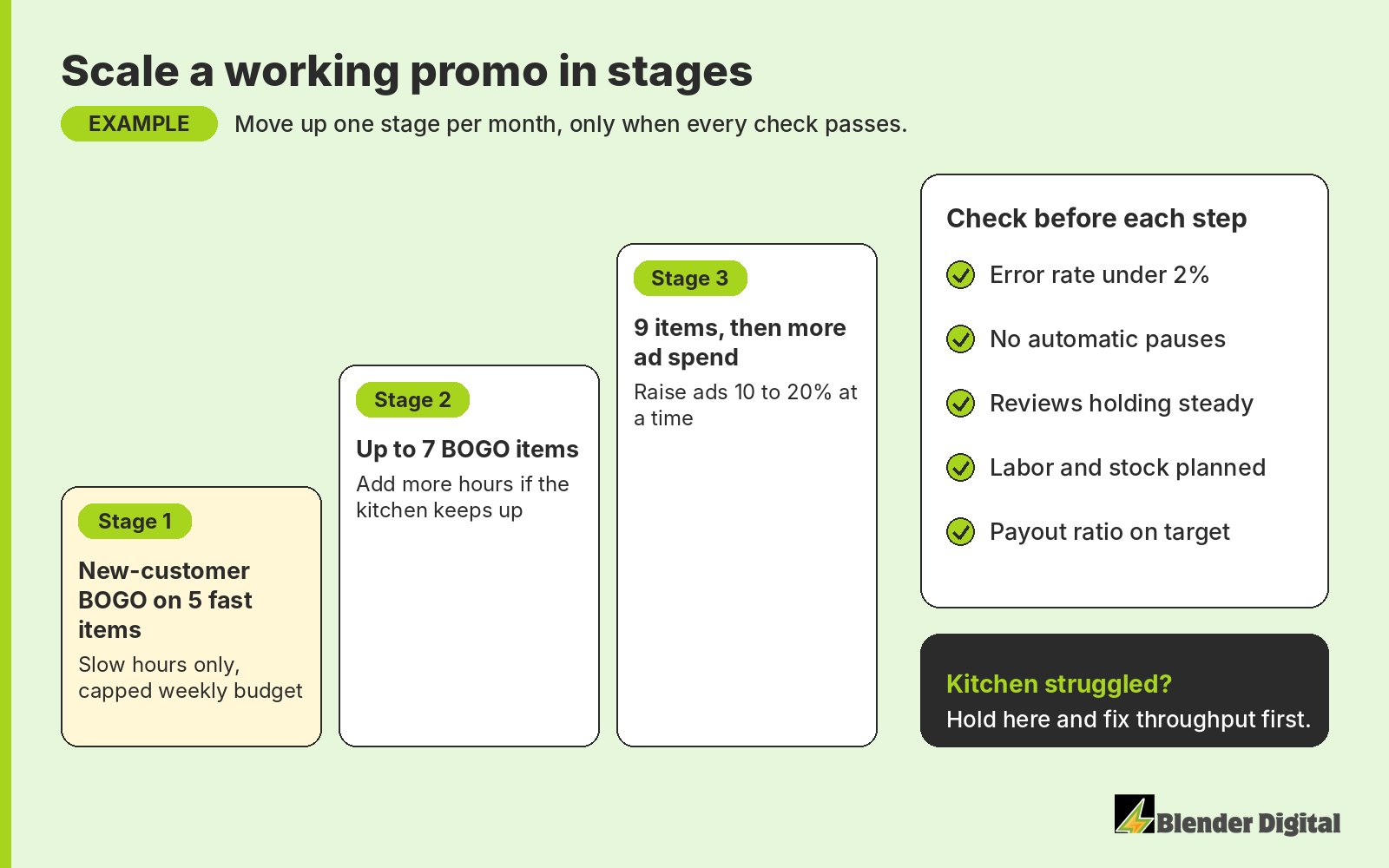
Adding BOGO items each month, 5 to 7 to 9, is the simplest trick in the house, because more items reach different tastes. Ad spend moves in 10 to 20% steps. Before each step, plan the labor and the inventory, not after the weekend shows you the gap.
How does Blender scale promos without breaking the kitchen?
Kitchen capacity is one of the first things I raise with an owner, before the campaign plan goes out. Promos that work go up in stages, and if a step pushes errors or waits up, we hold. Our campaign strategy sets the pace, and our error handling team watches error charges every day. We review every error charge daily and prepare the disputes for you to submit.
Sometimes the constraint is the whole brief. A historic diner in San Francisco runs several brands out of one kitchen. The goal was about $10,000 in extra delivery sales within four months without giving up a 70% payout ratio, with a kitchen already cooking for several menus. The owners didn't want BOGOs, so we used threshold offers, better photos and small offers for lapsed customers instead. In September 2026, the first month (Uber Eats, DoorDash and Grubhub across all brands), the payout ratio was 76.1% against the 70% target, and errors were 1.5% of orders (15 of 994). Sales came in 4.1% under the first month's goal, and the report said so. Slow and clean was the plan.
If your promos are working and the kitchen is paying for it, send me your last full month of orders and error charges. Blender's here to help. Book a free 30-minute call and we'll work out what your kitchen can take.
FAQ
Should I pause my DoorDash store when it's too busy?
In a real rush, yes. A short pause beats late or wrong orders. Use the tablet Status menu or Store Availability in the Merchant Portal, and remember to turn it back on. Pausing often costs you orders and placement, so treat repeated pauses as a capacity problem.
Should I increase my prep time on DoorDash or Uber Eats?
Only if your data shows couriers waiting on you. For a short rush, use Busy on the DoorDash tablet or Busy Mode in the Uber Eats Orders app, which add time temporarily, and switch back when it ends.
Can I schedule a delivery promo for certain hours?
Yes. DoorDash has time-based promotions like Happy Hour and Lunch Specials, and Uber Eats lists Happy hour among its offer types. Run the promo in slow windows and keep it off your organic peaks. Leave sponsored listings unscheduled.
What error rate is too high on DoorDash and Uber Eats?
I use 2% of orders as the line, which is where Uber Eats draws it. The DoorDash benchmarks I've seen run from 2% to 6.5% by store. If the rate climbs while a promo ramps up, hold the promo and fix the kitchen first.
Will a busy kitchen hurt my ranking?
It can. DoorDash measures your error rate against peers and can automatically pause a store with high avoidable wait times for up to 30 minutes. Slow, wrong orders also lead to low ratings, which hurt conversion.