
Are you struggling to keep up with reviews on two apps at once? Finding a one-star a week later, after the reply window has closed? Not sure if three bad reviews in a row mean something is wrong in the kitchen, or what offer to put in a reply?
Most owners I talk to check reviews when they remember to, usually after the rating has already dropped. One owner had a single customer behind 26 of 29 one-star reviews. When we wrote it up for the platform, the numbers told the story: without him the store's one-star rate was 2%, with him it read as 16%. The customer got banned. The reviews stayed up.
None of that gets caught without a routine. Here's where to find your reviews on each app, a 10-minute daily check, how to tell a real problem from one bad customer, and which offer to send in each case.
Quick answers and quick fixes
- Finding reviews after the window closed? Check once a day. DoorDash gives you 7 days to reply and Uber Eats gives you 14.
- Can't find the bad ones fast on DoorDash? In Ratings & Reviews, set the date to yesterday and the rating to "Didn't like."
- Three low reviews in a row? Check whether they share a customer, an item or a shift before you change anything.
- One customer flooding your page? Count the reviews, list the order IDs and send it to your rep.
- Not sure what offer to send? About $5 for a new customer or a complaint, $2 to $3 for a regular, and nothing on orders under about $20.
- Too many reviews to answer by hand? Set up Uber Eats auto replies with rules by rating, customer type and order size.
Where do I see all my DoorDash and Uber Eats reviews?
DoorDash. In the Merchant Portal, open Customers, then Ratings & Reviews. You can filter by date (last seven days, this week, last month, or a custom range up to 90 days), by rating (Loved, Liked or Didn't Like), by public review or private feedback, and to only reviews with written comments. To reply, click Respond under the review, write your message, add a discount if you want, and send. DoorDash replies go to the customer privately (DoorDash Help).
Uber Eats. In Uber Eats Manager, go to Customers, then Feedback, then Reviews, and click Reply. Uber says the customer sees your reply as a push notification, an in-app banner and on your storefront. Auto replies live in the same place under Manage auto replies, where you can choose who gets them by rating, customer type or minimum order spend (Uber Eats guide). Uber also shows your highest and lowest-rated menu items and the issues customers flag most, under the Menu item tab (Uber Eats Manager guide).
Grubhub is usually a small share of orders, so I don't build a daily habit around it. A weekly look is enough for most stores.
How often should I check, and how long do I have to reply?
Once a day. DoorDash gives you 7 days to reply and recommends replying within 24 hours. Uber Eats gives you 14. If a bad review comes in on a Friday night and you first see it the next Saturday, you've lost the chance to answer it on DoorDash.
This is the check I'd run every morning. It takes about 10 minutes for a single store:
- DoorDash: open Ratings & Reviews, set a custom date range for yesterday, and set the rating filter to "Didn't like." Now you're only looking at the reviews that need attention.
- Uber Eats: open Customers, then Feedback, then Reviews, and read every 1 to 3 star review from the last day.
- Log each low review in a simple sheet: date, app, order ID, stars, the item, and which bucket it falls in. My buckets are taste, price, slowness, and missing or wrong items.
- Check for an error charge on the same order. On DoorDash, error charges are under Financials, then Transactions. A review that says "missing fries" usually comes with a charge.
- Reply, with an offer where it fits (more on that below).
Then once a week, total it up: reviews per app, low reviews, replies sent, and your review rate (reviews divided by orders). Most stores I look at run 3% to 6%. That number matters for tracking, because at 300 orders a month and a 4% review rate you only get about 12 reviews. Three bad ones in a week is a quarter of your month.
How do I spot a bad streak before it hurts my rating?
Look at the log, not the stars. A run of low reviews almost always has something in common, and the fix depends on what it is:
- Same customer. One person leaving several reviews is something to take to the platform. The kitchen can't fix it. More on that below.
- Same item. Check the recipe, the portion and the menu description. I once found fries described with jalapeños they didn't have, and that line kept producing complaints on orders the kitchen made correctly.
- Same shift or day. Look at who was working and how busy it was. A promo that doubled Friday orders can show up as slow, cold food on Friday reviews.
- Missing or wrong items. Match them to the error charges. If the order left your counter complete, dispute the charge.
When I sort one-star reviews, they mostly land in three places: taste, price and slowness. Slowness you can't control. Taste is something you can cautiously look into. Price you're not going to change for one customer.
When it is the food, keep the message to the kitchen short and blame-free. Something like "worth passing this along to the kitchen or checking portioning" gets a better response than a list of complaints.
Speed matters because the rating reacts fast. On Uber Eats, roughly 90% of your store rating's weight sits on the last 90 days. I explain what that means for your sales in how ratings affect DoorDash and Uber Eats sales.
What if one customer keeps leaving one-star reviews?
Write it up and send it to your rep. Keep it factual: how many reviews, over what dates, the order IDs, what your one-star rate looks like with and without that customer, and exactly what you're asking for. That's how the 26-of-29 case got the customer banned.
Set your expectations, though. On Uber Eats, reviews from genuine buyers generally won't be removed, but a problem customer can be blocked from ordering at your store. DoorDash says public reviews can be rejected if they break its review guidelines, for example if they're abusive or mainly about the delivery, and US merchants report a review by contacting DoorDash (DoorDash Help). How repeat reviews from one person count on Uber is covered in can the same customer review an Uber Eats restaurant more than once.
Which offer should I put in a review reply?
A reply with an offer is a reason to come back. About 30% of customers who get one return within 30 days, and these offers usually return 3 to 8 times what they cost. Here's how I match the offer to the review:
| Review | What I send |
|---|---|
| New customer, good review | About $5 off the next order |
| Regular, good review | $2 to $3. They already like you. |
| Low review or complaint | An apology and an offer: "Sorry we didn't hit the mark, here's something to come back." |
| Order under about $20 to $25 | A reply, no offer |
The setup changes with where your store is. Under about 100 reviews, reply to every review with an offer and run a card in the bag. Past 100 reviews at 4.5 stars or better, you can taper the card and keep the replies going. Once volume is high, Uber Eats auto replies save a lot of time. Manual Uber reply offers have a $5 minimum, but automation lets you set custom amounts like $3. DoorDash replies are manual only, any dollar amount, and DoorDash doesn't track whether the offer was redeemed.
The bag card wording and reply phrasing that gets past the platforms' filters are in how to get more reviews on DoorDash and Uber Eats, so I won't repeat them here.
Example: the daily check on one page
This is the routine and the streak check together. Print it or keep it next to the tablet.
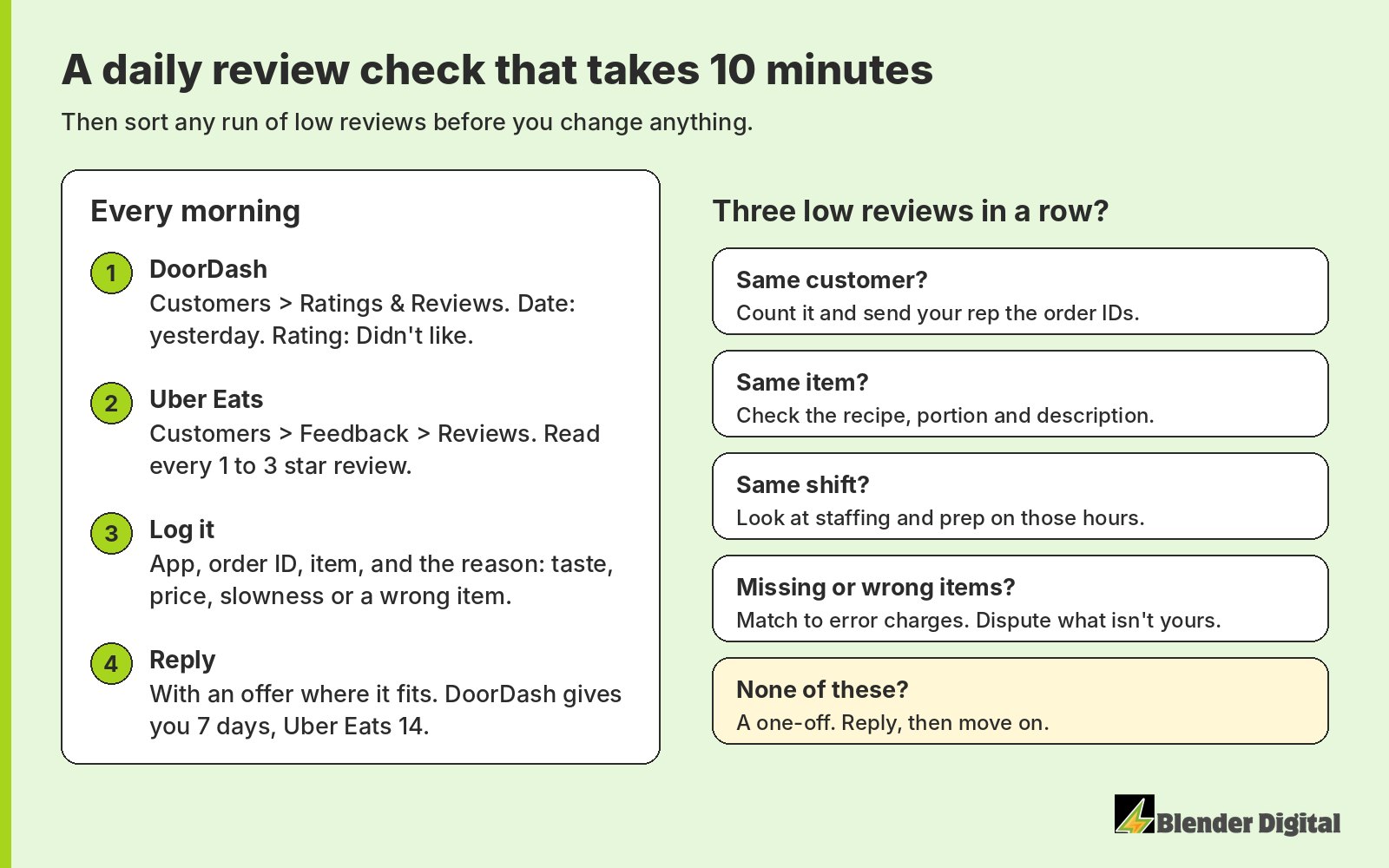
The point of the log is that it turns "we got slammed this week" into something you can act on. Five one-star reviews from five customers about the same burger is a recipe problem. Five from one customer on one day is a report to the platform.
How does Blender handle reviews for clients?
We read every new review on Uber Eats and DoorDash every day and reply to each one inside the platform's window, usually with an offer. Any 1 to 3 star or "didn't like" review goes to the owner the next morning with the order ID and time, so they can check the shift or the camera. On Mondays the owner gets a separate summary of the week's reviews and offers redeemed. When low reviews bunch up, we sort them before anyone changes the menu, and when one customer floods a page, we document it and take it to the platform. That's our review management work.
Error charges run alongside it. We review every error charge daily and prepare the disputes for you to submit, which you can read about on our dispute management page.
Back to that San Francisco diner. In September 2026 it got 43 Uber Eats reviews, 32 of them five-star, and we answered all 43. On DoorDash we answered 18 of 19. Half of the month's Uber Eats one-stars came from one regular on one day, which is exactly the kind of thing a weekly glance at the star rating would have misread.
If reviews keep slipping past you, Blender's here to help. Book a free 30-minute call and we'll look at your last month of reviews with you.
FAQ
How long do I have to reply to a DoorDash review?
Seven days. DoorDash recommends replying within 24 hours. Replies are sent privately to the customer, and you can add a discount for a future order.
How long do I have to reply to an Uber Eats review?
Fourteen days. Uber says customers see your reply as a push notification, an in-app banner and on your storefront.
How do I see only my bad reviews on DoorDash?
In the Merchant Portal, open Customers, then Ratings & Reviews. Set the date filter to the day you want and the rating filter to Didn't Like.
Can I get a bad review removed from DoorDash or Uber Eats?
Reviews from genuine buyers usually stay up. DoorDash can reject reviews that break its guidelines, and on Uber Eats a problem customer can be blocked from ordering at your store. Document repeat reviewers and send it to your rep.
Should I add an offer to every review reply?
Most of them. I send about $5 to new customers and complaints, $2 to $3 to regulars, and skip the offer on orders under about $20 to $25.