
Are you struggling to find error charges before the dispute window closes? Not sure which ones are worth fighting? Disputing and losing? Or seeing the same missing item on the report week after week?
Here's one I'd dispute every time. A brand-new account, no Uber One membership, a name typed in all lowercase, and a claim that "everything was missing." Compare that with a customer who's ordered twenty times and says one drink was missing. That person is almost always telling the truth. You can only tell the two apart if somebody actually looks at each charge while there's still time to do something about it.
I already wrote about what error charges cost you, so I won't repeat the math. This post is the routine: where to look, how to sort what you find, what to log, and how to fix the causes.
Quick answers and quick fixes
- Missing the window? Check daily, or at least every few days. DoorDash allows 14 days in the portal. Uber Eats allows 30 days from the order date.
- Can't find the charges? DoorDash: Financials, then Transactions, filtered to "Error charge." Uber Eats: the Orders tab, filtered to "Issue charged."
- Not sure what to dispute? Anything that wasn't the kitchen's fault, and claims that look off. Skip the small, honest ones.
- Losing disputes? Attach a screenshot or a photo and note when the courier picked up. Skip long videos.
- Same item every week? Fix its description, or turn the request people type into notes into a modifier.
- Thinking of disputing everything? Don't. DoorDash can temporarily restrict stores that dispute too much.
Why do error charges get away from you?
Every one is small, so nobody owns it. The window is short, the charges are spread across two or three apps, and they show up days after the order, when the shift that made it has gone home. Some of them aren't even the kitchen's fault: a courier grabbed the wrong bag, or the delivery ran late.
And it isn't only money. Error rate feeds the algorithm. DoorDash measures you against your peers, and if your kitchen keeps making mistakes, it shows you less. On Uber Eats, under 2% of orders is "just a way of doing business." Above that, it starts to cost you visibility as well as refunds.
Where do I find error charges on DoorDash and Uber Eats?
| DoorDash | Uber Eats | |
|---|---|---|
| Where | Merchant Portal, Financials, then Transactions. Filter the type to "Error charge," click the order, then "Dispute Charge." You need Admin or Store Manager access. | Uber Eats Manager, the Orders tab. Filter to "Issue charged" and use the dispute button on the order. |
| Window | The delivery must be within the last 14 days. Older ones go through support. | 30 days from the order date. |
| Worth knowing | DoorDash says it typically doesn't issue error charges for late deliveries, no-shows or temperature issues. If you see one, dispute it. | "Uber refunded" means the courier side paid, not you. Uber says it doesn't charge for damaged orders, food condition complaints or late deliveries by its couriers. |
Sources: DoorDash order error help and Uber Eats order errors. The "Issue charged" filter name is from my own use of the portal. Uber renames things now and then.
One DoorDash rule to know before you get help: its help article says using third parties to submit error charge disputes goes against its terms. Anyone can help you find and prepare disputes, but the restaurant should be the one clicking submit.
What does a 10-minute daily error routine look like?
Same time every day, before the lunch rush is a good slot. Give it to one person, so it's somebody's job and not everybody's.
- Pull yesterday's charges. DoorDash Transactions filtered to error charges, then Uber Eats Orders filtered to issue charged.
- Log each one. A simple sheet: date, app, order ID, item, amount, what the customer said, whose fault it looks like, evidence, date disputed and result.
- Sort it into one of three piles. Not our fault, looks off, or a real kitchen mistake. The next section covers how.
- Grab the evidence. A screenshot of the order ticket, a photo from the pickup shelf, the time the courier picked up. If you can, point a camera at the pickup shelf so you always have this.
- Dispute from your own login, inside the window, with the evidence attached and one or two plain sentences. Keep it short.
- Pass kitchen mistakes along. Short and blame-free: "Worth passing this along to the kitchen or checking portioning as needed."
Then once a week, spend ten more minutes on the log: which disputes came back, how much you recovered, and which items keep showing up.
Which error charges are worth disputing?
My rule: "Don't try to solve for issues that are not your fault." Then pick the ones you can win.
- Not the kitchen's fault: dispute. Courier batching, cold or late food, items that were handed over complete. Your pickup-shelf photo is the evidence.
- Looks off: dispute. A new customer, no membership, an odd name and "everything was missing" is the classic pattern. Uber One members with a long order history are lower risk.
- Honest and small: let it go. A regular who says one item was missing is probably right. Skip charges under about $5. Over about $10, dispute when you have evidence.
- The kitchen got it wrong: don't dispute. Log it and fix the cause.
Don't dispute everything to see what sticks. DoorDash says stores with a very high volume of dispute attempts in a short time can be temporarily restricted from disputing. Weak disputes cost you the strong ones.
Two Uber Eats extras. If a courier keeps causing problems, you can unpair that courier from your store. And if a driver picks up the food and then cancels, you should still be paid, so ask for the credit if it doesn't show up.
How do I stop the same errors from coming back?
Disputes get money back. Fixing the cause keeps it from leaving in the first place. When the weekly look at your log shows a repeat, these are the usual fixes:
- Fix the description. I've seen fries described with jalapeños they didn't have. Customers ordered what they read and reported what they didn't get.
- Turn notes into modifiers. Requests typed into the notes field get missed. A modifier prints on the ticket.
- Handle out-of-stocks properly. Call the customer and offer a swap or a cancel. Never send a substitute they didn't agree to. "If they say cancel my order, don't worry about losing that order."
- Check that 86s stick. On DoorDash, items marked out in its menu manager come back after 24 hours, and items 86'd in Toast don't always sync. Check the app itself.
- Plan for busy nights. If a promo is about to double your orders, line up staff and stock first. In a rush, pause the store for a few minutes. Just remember to turn it back on. More in what to do when promos work but the kitchen can't keep up.
Stores with a hands-on owner or manager watching this have far fewer errors. For menu problems that cause errors, see delivery menu mistakes that cost you orders.
Example: one day of the error log
Four charges from one morning, sorted the way I'd sort them.
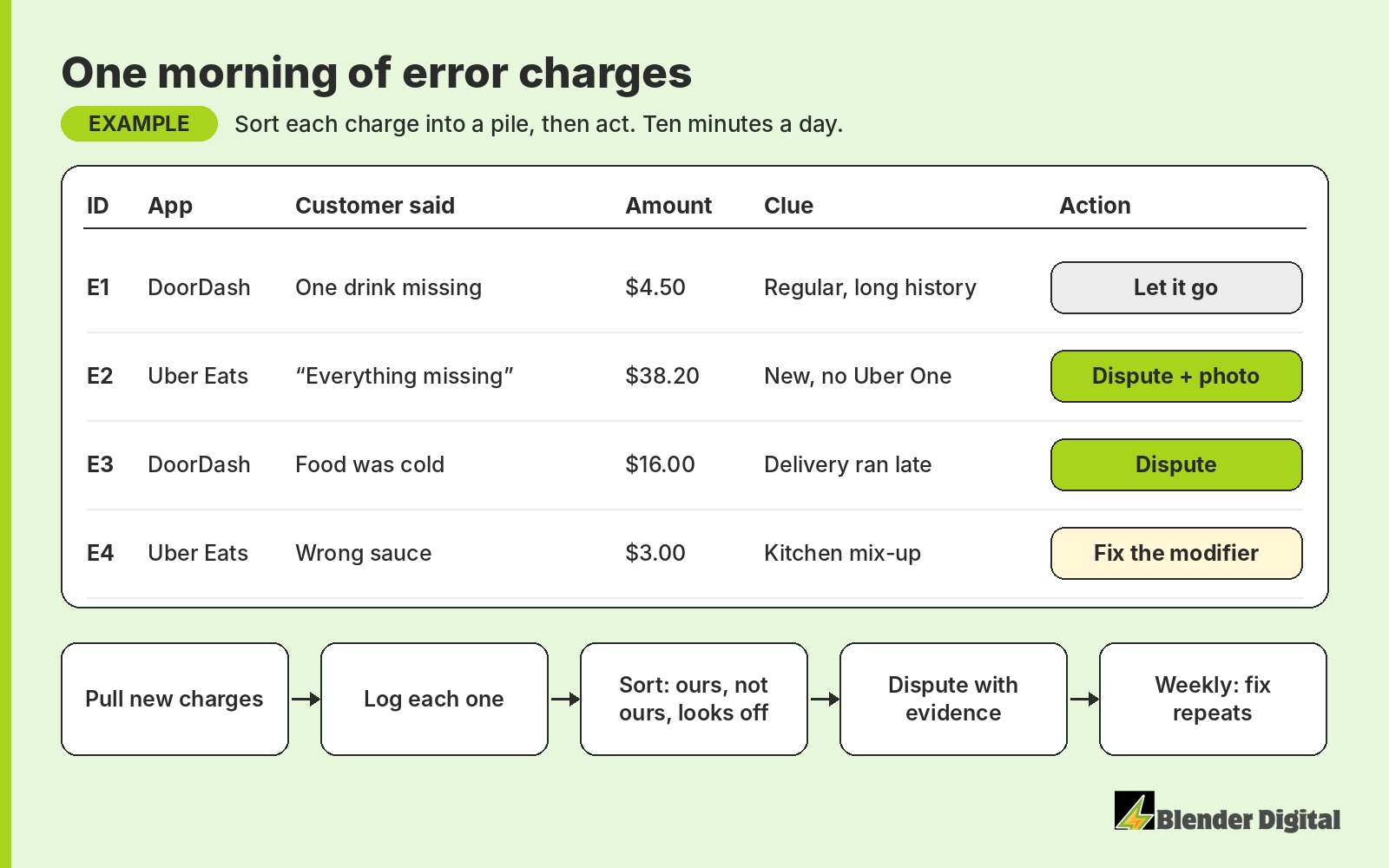
How does Blender handle errors and disputes?
We review every error charge daily and prepare the disputes for you to submit. Before anything goes in, we check with your location manager on what actually happened, so you only dispute charges you can win. You get a short daily email listing the new charges, and you reply with the ones you want disputed, like "Dispute E1, E3." A separate Monday email shows what was charged, what was disputed, what came back and what's still pending. For the restaurants we manage, that recovers $200 to $1,200+ per month per location, depending on volume. More on our dispute management page.
The log is also how we catch a problem early. At a fast-casual franchise in New Jersey, the error rate rose to 2.2% in September 2026 (11 of 507 orders across Uber Eats, DoorDash and Grubhub, $115.76 charged), up from 0.7% the month before as orders more than tripled. All 4 disputes we prepared were won, $54.84 back. The bigger job was the cause: what was going wrong as volume jumped, raised carefully with the team. That's our error handling work.
If error charges are slipping past you, Blender's here to help. Book a free 30-minute call and we'll look at last month's charges with you.
FAQ
How long do I have to dispute a DoorDash error charge?
In the Merchant Portal, the delivery must have happened within the last 14 days. Older charges have to go through DoorDash support. Checking daily, or at least every few days, keeps you inside the window.
How long do I have to dispute an Uber Eats order error?
30 days from the order date. Use the dispute button in the Orders tab in Uber Eats Manager.
Should I dispute every error charge?
No. Dispute charges that weren't the kitchen's fault and claims that look off, with a screenshot or photo as evidence. DoorDash can temporarily restrict stores that make a very high number of dispute attempts in a short time.
Can someone else submit my DoorDash disputes for me?
DoorDash's help center says using third parties to submit error charge disputes goes against its terms. Someone can help you find and prepare disputes, but the restaurant should submit them from its own login.
What is a normal error rate on DoorDash and Uber Eats?
Under 2% of orders is normal. DoorDash compares you with your peers, and a high error rate can mean the app shows your store less.