
Are you struggling to figure out why your payout is so much lower than your sales? Why Uber Eats seems to be holding back money? Why the weekly deposit never matches what Toast says you sold? Or what "marketing fees" and "adjustments" even mean?
You're not the only one. An owner once told me flat out, "Uber is scamming me." It wasn't. His W-9 was missing, so Uber was withholding 24% of his payouts for the IRS, and nobody had explained it to him.
The apps give you a lot of numbers and almost no explanation. I read these statements for our clients every month. Here's where to find them, what each line means, when the money lands, and the one number to track.
Quick answers and quick fixes
- Payout far below sales? Usually normal. Commission takes 15% to 30%, then promos, ads, offer fees and error charges come out. While you're running promos, 50 to 60 cents on the dollar is typical.
- Uber holding 24%? Check your tax info: Uber Eats Manager, then Settings, then Tax / Invoice, then Tax Setting.
- Weekly payout doesn't match your POS? The apps close their pay week on their own clock. Compare full calendar months instead.
- Grubhub money missing? Make sure direct deposit is actually set up under Settings, then Payment.
- Dashboard says sales are up 11,000%? Ignore the "vs prior period" view and do your own month-over-month math.
- Want one number to track? Net payout divided by sales. That's your payout ratio.
Where do I find my DoorDash, Uber Eats and Grubhub statements?
DoorDash. In the Merchant Portal, open Financials. You get three tabs. Transactions shows orders and estimated payouts. Payouts shows finalized payments with order-level detail, and it's the one DoorDash says to use for reconciling. Statements holds your monthly statements, available by the 5th of each month (DoorDash Help). DoorDash's Monthly Recap is the fastest read because it shows your net payout directly.
For an order-by-order file, go to Reports, then Create report, and pick Financial Report. You can run it once or set it to repeat weekly or monthly. Only Admin and Manager users can export it. For a date range, add a day on each side so no orders fall off the edges (DoorDash learning center).
Uber Eats. In Uber Eats Manager, open Payments to see earnings against net payout, week by week. Click Download CSV and pick Payment Details. It breaks out every order, covers up to 31 days and gets emailed to you (Uber Help).
Grubhub. Log in at restaurant.grubhub.com on a phone or computer with an admin account. Basic users can't see financials. Payment setup lives under Settings, then Payment (Grubhub help center).
What does each line on a DoorDash statement mean?
These are the column names in a DoorDash financial export. The definitions follow DoorDash's own payout guide, in plain words.
| Line | What it means |
|---|---|
| Subtotal | Your food sales before tax, commission, fees, error charges and tips. This is your gross. |
| Tax (subtotal) | Sales tax collected from the customer. In most states the app sends it to the state, and it isn't your money to keep either way. Have your accountant check the tax columns. |
| Commission | Your plan's rate (15%, 25% or 30%). It's charged after discounts, not on the full menu price. |
| Customer discounts from marketing (funded by you) | The part of a promo you paid for, like the free item on a BOGO. |
| Customer discounts from marketing (funded by DoorDash) | The part DoorDash paid for. It doesn't come out of your payout. |
| Marketing fees (including any applicable taxes) | What you paid to market on DoorDash: sponsored listings and the $0.99 fee on each redeemed offer. |
| DoorDash marketing credit | Ad credit DoorDash gave you. It offsets marketing fees. |
| Error charges | Money refunded to customers for missing or wrong items, charged back to you. |
| Adjustments | Additions or corrections to your earnings. |
| Net total | What you actually get paid. |
What does each line on an Uber Eats statement mean?
Uber uses different words for the same ideas. These are the columns as they show up in the Payment Details export. Uber renames them now and then, so yours may read slightly differently.
| Line | What it means |
|---|---|
| Sales (excl. tax) | Your food sales before tax. This is your gross. |
| Marketplace fee | Uber's commission. Since March 11, 2026: 20% on Lite, 25% on Plus (30% on Uber One orders), 30% on Premium, and 7% on pickup. |
| Promotions on items | Item discounts you funded, like a BOGO. |
| Promotions on delivery | Delivery discounts you funded, like free delivery. |
| Refunds | Money given back to customers on refunded orders. |
| Order error adjustments | Charges for missing or wrong items. You have 30 days to dispute them on Uber. |
| Adjustments | Other corrections, up or down. |
| Total payout | What you actually get paid. |
Ad spend comes out of your payouts on both apps too.
Why is Uber Eats holding 24% of my payout?
Almost always, it's because your tax information is missing or doesn't match IRS records. That's backup withholding. The IRS requires a payer to withhold a flat 24% when you haven't given it a correct taxpayer ID (IRS Topic 307). Uber's help center says the same thing for merchants: 24% of your earnings "may be withheld from your payments until the proper tax information is added" (Uber Help).
Backup withholding is tax held back on your behalf for the IRS. Uber doesn't keep it as a fee. That was the whole story with the owner who thought he was being scammed.
How to fix it:
- Log in to Uber Eats Manager as an Admin or Manager. Other roles can't see tax settings.
- Go to Settings, then Tax / Invoice, then Tax Setting.
- Check the legal name, taxpayer ID (EIN or SSN) and legal address. They need to match what the IRS has for your business.
- Fix anything missing or wrong and click Submit.
Uber says withholding stops after you add accurate and complete tax information.
Do you get the money back? Not as a payout from Uber. Uber's page tells merchants to consult a tax professional about withheld earnings. The IRS says backup withholding shows on your Form 1099, and you report it as federal income tax withheld on your return for that year (IRS). Hand the 1099 to your accountant.
When do DoorDash, Uber Eats and Grubhub pay you?
- DoorDash pays weekly unless you switch to daily payouts (Settings, then Account settings, then Get Daily Payouts). A payout covers whatever orders fell in its pay period, and that period can straddle two months. So your monthly statement will never equal the sum of that month's deposits.
- Uber Eats pays weekly. Uber says the payout is generally sent the Tuesday after the pay week. The week closes around late Sunday night, which is why your Uber weekly total won't match Toast's week.
- Grubhub lets you pick how often you're paid when you set up direct deposit. Check that it's actually set up. I once found a store with $996 sitting unpaid on Grubhub.
Watch the last few days of any month. DoorDash's Transactions tab shows estimates, and payouts for the final days of a month settle in the next one. In our September 2026 client reports, DoorDash payouts for the last three or four days of the month were still estimates, so we marked them and checked them again in October.
Why do the dashboard comparisons look wrong?
Because they often are. The "vs 7 days prior" and "same day last year" views can be off or wildly inflated. I've seen one show sales up 11,000%. Single orders also pay out anywhere from 20 to 80 cents on the dollar, but over a month they meet in the middle. Judge on full calendar months, per platform, and do the math yourself.
Example: how does $1,000 in sales turn into a payout?
A simplified month on a 25% DoorDash plan, with a BOGO and a small ad budget running. Tax and tips are left out.
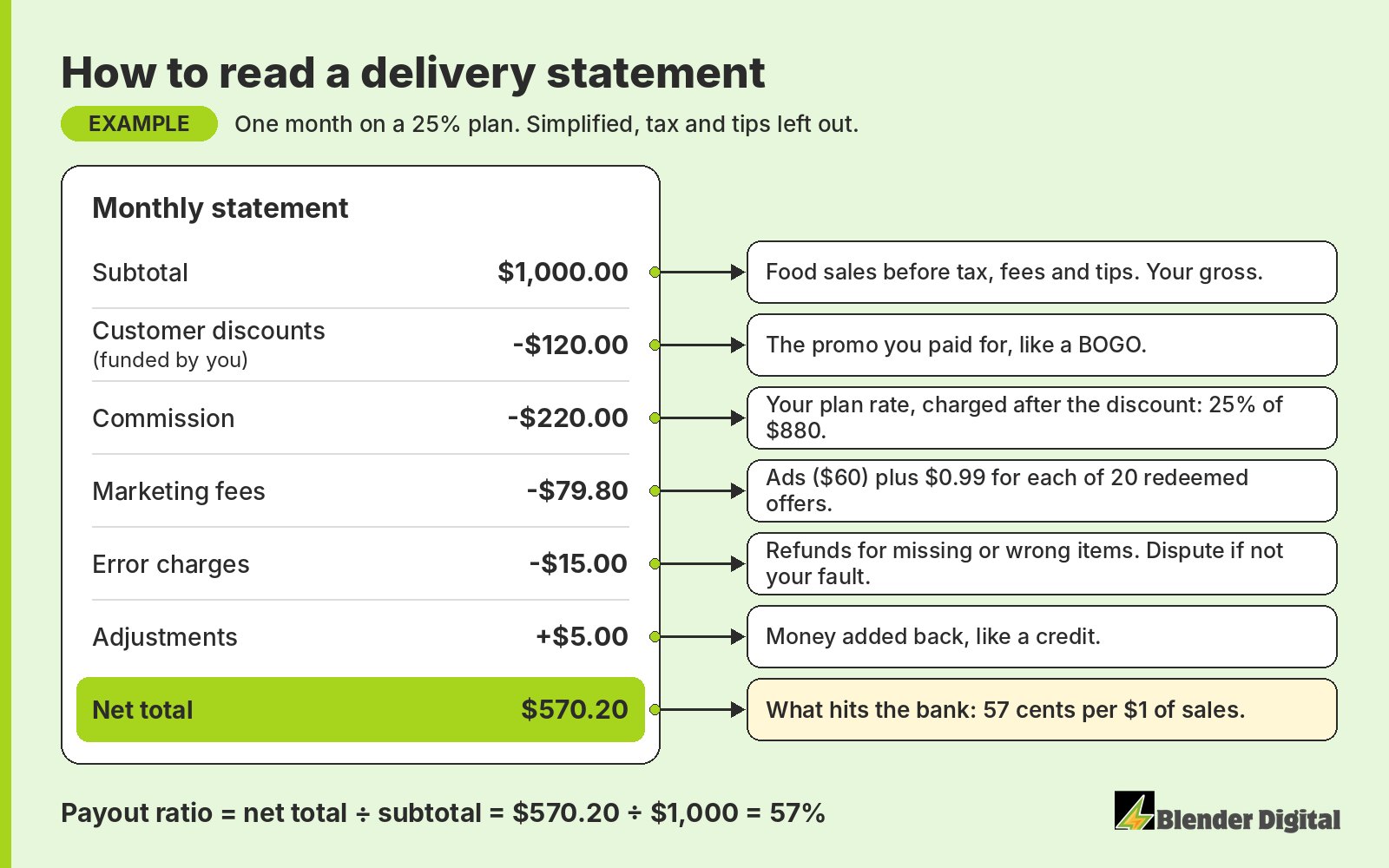
Two things to notice. Commission is charged after the discount: 25% of $880, not of $1,000. DoorDash puts that in writing in its promotions FAQ. And the statement only shows the revenue you gave up on the BOGO. The food cost of the free item never appears on it, so you're eating that too. For every cost, including the ones that never show on a statement, see the true cost of selling on DoorDash and Uber Eats.
How do I turn my statement into one number?
Divide what you got paid by what you sold. On DoorDash that's net total divided by subtotal. On Uber Eats it's total payout divided by sales (excl. tax). In the example above, $570.20 on $1,000 is 57%. You got paid 57 cents on every dollar.
That's your payout ratio, and it's the number I lead with on every account. If it moves, something underneath it moved, and you go find out what. With no promos you can't do better than about 70 to 85 cents. In a growth phase around 50 is respectable and 60 is good. I go deeper on the bands in how much delivery revenue you actually keep.
Once you know your payout ratio, plug it into the markup parity calculator to see what your delivery prices need to be to get paid the same as in-store. If you're wondering what each plan charges in the first place, start with how much DoorDash and Uber Eats charge restaurants.
How does Blender handle statements for clients?
Our clients don't read these line by line. We do. Every month we walk the owner through a report with goals against actuals, plus sales, orders, average ticket, payout and payout ratio for each platform. Growth sits at the top with the payout ratio right beside it, so nobody mistakes sales bought with giveaways for progress. More on our reporting and dashboards page.
Error charges get the same attention. We review every error charge daily and prepare the disputes for you to submit, and a separate Monday email shows what was charged, what was disputed and what came back. That's our dispute management work. And when a payout looks wrong, the first things we check are the W-9 and the statement lines.
Here's what that looks like on a real account. A taco shop on Long Island grew delivery sales 50.4% in its first managed month, from $6,291 in August to $9,463 in September 2026, across Uber Eats, DoorDash and Grubhub. It beat its $8,000 goal, and it did it at a 62.3% payout ratio, above the 50% target we set at the start. The payout ratio is what told the owner the growth was worth having. To track it month to month, use the simple tracking sheet I set up for owners.
If your statements still don't add up, send us your last full month from each app. Blender's here to help. Book a free 30-minute call and we'll walk through it with you.
FAQ
Why is my DoorDash payout so much lower than my sales?
Commission comes out first, at 15%, 25% or 30% depending on your plan. Then the promos you fund, marketing fees (ads plus $0.99 per redeemed offer) and error charges. While you're running promos, getting paid 50 to 60 cents per dollar of sales is normal.
Why is Uber Eats holding 24% of my payout?
Usually because your W-9 tax information is missing or doesn't match IRS records. That triggers 24% backup withholding. Fix it in Uber Eats Manager under Settings, then Tax / Invoice, then Tax Setting. Uber says withholding stops once accurate tax info is added.
Do I get Uber's 24% backup withholding back?
Not as a payout from Uber. The IRS says backup withholding is reported on your Form 1099 and claimed as federal income tax withheld on your return for that year. Uber tells merchants to consult a tax professional about withheld earnings.
When do DoorDash and Uber Eats pay restaurants?
Both pay weekly by default. DoorDash offers daily payouts under Settings, then Account settings. Uber says payouts are generally sent the Tuesday after the pay week, and its week closes around late Sunday night.
Why doesn't my weekly payout match my POS sales?
The apps close their pay weeks on their own schedule, payouts can straddle two months, and the payout is net of commission, promos, ads and errors. Compare full calendar months using the monthly statement.