
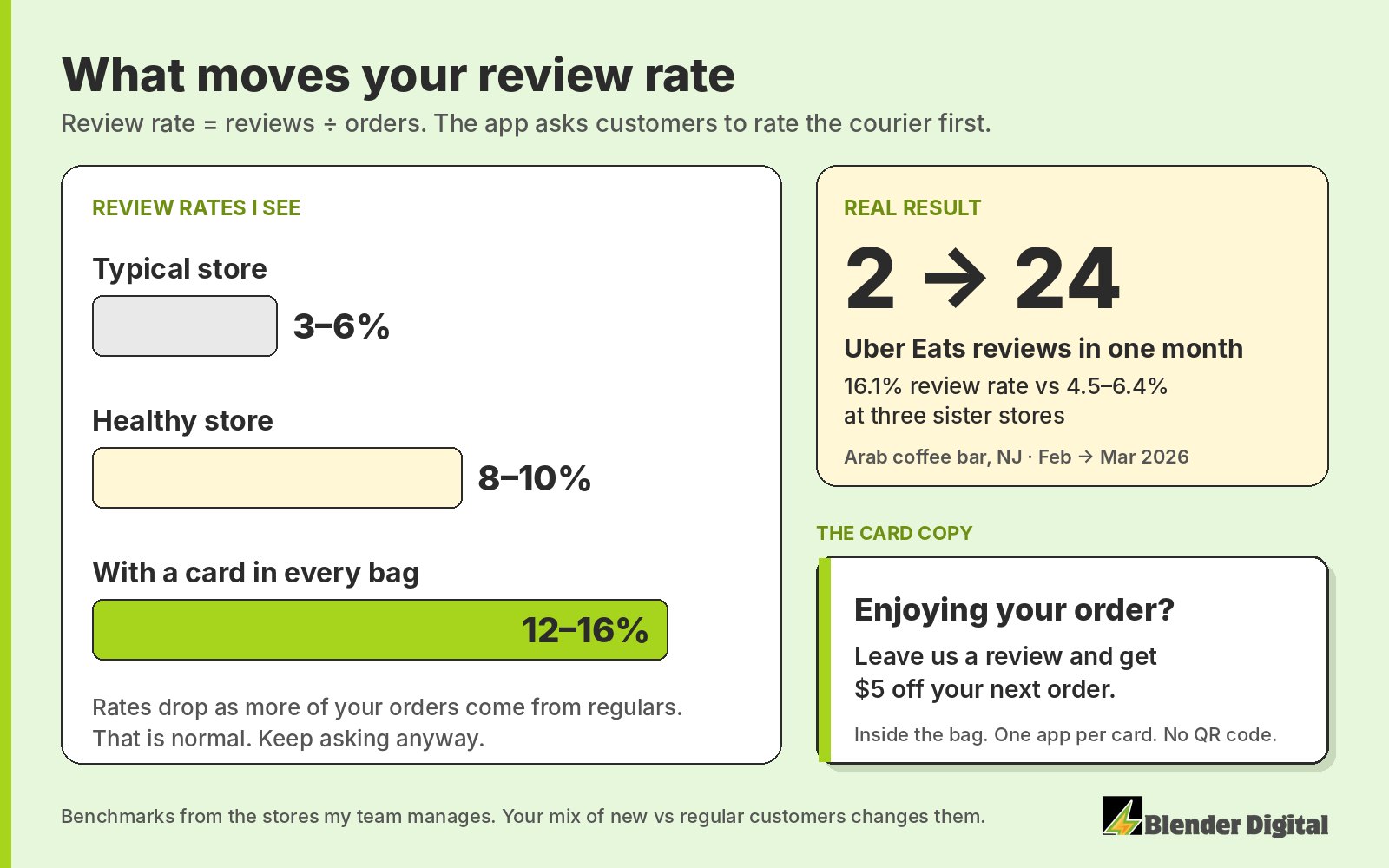
Between February and March 2026, an Arab coffee bar in New Jersey that my team manages went from 2 Uber Eats reviews in a month to 24. Its review rate that month was 16.1%. Three of its sister stores were sitting between 4.5% and 6.4%.
The difference was a printed 4x6 card in every bag. Below is how we set that up, plus the reply-with-an-offer habit that keeps reviews coming on both DoorDash and Uber Eats.
How do you get more reviews on DoorDash and Uber Eats?
Ask inside the bag, give people a small reason to do it, and reply to the reviews you do get with an offer to come back. A card that says "Leave us a review and get $5 off your next order" has done more for review counts than anything else I've tried. Replies with offers bring customers back, and every order they place is another chance to get reviewed.
The stars themselves still come from the food and the operation. Taste, accuracy, speed. Cards and replies get you more reviews. They won't turn a bad order into a good one.
Why is my review rate so low?
Review rate is reviews divided by orders. Most stores I look at run 3% to 6%. So if you do 300 orders a month, you're getting somewhere between 9 and 18 reviews. Healthy is 8% to 10%. With a card in the bag I've seen 12% to 16%.
Part of the reason is how the apps are built. When a customer goes to rate their order, they get asked about the courier first. When you're leaving a review, you're competing against leaving a review for the courier. A lot of people tap the driver's stars and close the app.
Your rate will also drift down as more of your orders come from regulars. Someone on their tenth order doesn't feel the need to say anything. That's normal, and it's one more reason to keep a steady ask going instead of a one-time push.
What should the review card in the bag say?
One line: "Leave us a review and get $5 off your next order." Every bag you send out is a marketing vessel, so use it. A few rules I stick to:
- One app per card. An Uber Eats order gets an Uber Eats card. A DoorDash order gets a DoorDash card. Don't make the customer figure out where to go.
- Inside the bag. Never a sticker on the outside of the bag.
- No QR code. A QR code can't open the review screen for that customer's order, and that screen is where the review actually happens. Skip it.
- Keep it cheap. Printed cards run about $1 each. Handwritten round stickers inside the bag work too.
- Run it until you're around 100 reviews, then taper. More on why 100 below.
The offer is for leaving a review, any review. Don't tie it to five stars. Rewarding only positive reviews breaks the platforms' rules and can get reviews removed, as ChowNow's guide on review management points out.
Does replying to reviews get you more reviews?
Yes, and it's the part most owners skip. On Uber Eats, an offer attached to your reply comes with reminder notifications from Uber. Giving them an offer or replying to the review acts as a de facto push notification. The customer comes back, orders again, and has another chance to rate you.
About 30% of customers who get one of these offers come back within 30 days, and review-reply offers usually return 3 to 8 times what they cost. One real month: in September 2026, review-reply offers at a smash-burger ghost kitchen in Houston that we manage brought in $226 in Uber Eats sales on $40 of offers.
How I set them up:
- New customers get $5, regulars $2 to $3. A negative review still gets an offer: "Sorry we didn't hit the mark, here's something to come back."
- Skip small orders. If the order was under about $20 to $25, I leave the offer off.
- Watch the wording. End with "leave us another review for more offers like this." Don't write "leave a review and get $5" in a reply. The platforms screen reply text and that phrasing gets caught.
- Reply inside the window. Uber Eats gives you 14 days. DoorDash gives you 7.
The two apps handle this differently. On Uber Eats, a manual reply offer has a $5 minimum, but automated replies let you set custom amounts like $3, with rules by star rating, new or returning customer, and minimum spend. DoorDash replies are manual only, any dollar amount, and DoorDash doesn't track whether the offer got redeemed. So on DoorDash you're running it a bit blind. I still do it.
How many reviews do you need on DoorDash and Uber Eats?
My rule of thumb is 100+ reviews at 4.5 stars or higher. That's the point where a stranger scrolling the app sees enough proof to try you. Past it, the bag card has done its main job and you can ease off, while the reply offers keep running.
The count matters as much as the stars. A 4.2 with 1,000 reviews reads as an average store. A 4.5 with 150 reads as a store people like. I go deeper on that in how your DoorDash and Uber Eats rating affects sales. If you just launched on the apps, start the card on day one along with the rest of the first 30 days plan.
Frequently asked questions
Can I give customers a discount for leaving a review?
We do it for leaving a review, any review, with a card like "Leave us a review and get $5 off your next order." Don't make the offer depend on a five-star rating. That breaks platform rules.
Should I put a QR code on my review card?
No. A QR code can't open the review screen for the customer's specific order, which is where the review gets left. Just tell them which app to open.
What is a good review rate on DoorDash and Uber Eats?
Most stores run 3% to 6% of orders. 8% to 10% is healthy. With a review card in every bag, 12% to 16% is realistic.
How long do I have to reply to a review?
14 days on Uber Eats and 7 days on DoorDash.
Can the same customer review my store more than once?
On Uber Eats, yes, once per completed order. I explain how that works in can the same customer review an Uber Eats restaurant more than once.
Want a hand with this?
Bag cards, replying to every review with the right offer, and prepping disputes for the errors that aren't your fault are part of what my team runs every day for the restaurants we manage. If you'd like a second set of eyes on your DoorDash or Uber Eats setup, get in touch.