The most-read article on this site is the one on delivery app image sizes. Owners clearly want to get their photos right. The size is the easy part, though. What matters more is what's in the photo and whether it still looks good after each app crops it.
Your hero image is the big photo at the top of your store. DoorDash calls it the header, Uber Eats calls it the cover photo. It's the first thing a customer sees of you, before the menu, the prices or the reviews.
What makes a good hero image on DoorDash and Uber Eats?
A real photo of a dish people can actually order from you, shot wide with the food in the center, so it still works when each app crops it. For sizes: the DoorDash header is 16:9 at 1400 × 800 px minimum, and the Uber Eats cover is 5:4 at 2880 × 2304 px. Every other spec is in the delivery app image size guide.
That's most of it. The rest of this post is how to get there without paying for three separate shoots.
Why does the hero image matter so much?
Because every other thing you do sends people to it. When I go through a store before spending anything on ads, the hero image is the first thing I check. Then the menu, then pricing and ratings, then operations. Ads come last, because ads multiply whatever is already there. I lay out that order in what to fix before running DoorDash or Uber Eats ads.
The image also sits next to your offers. On DoorDash, your store card shows your best live campaign, which is why a BOGO tag lifts ad clicks. The photo is right beside that tag, so it needs to hold up.
Shoot one master photo, then crop it for each app
Every app wants a different shape. My rule is to shoot one good master photo, wide, with room around the food. Then export it three ways: 5:4 for the Uber Eats cover, 16:9 for DoorDash and Toast, and 1:1 for Grubhub and logos.
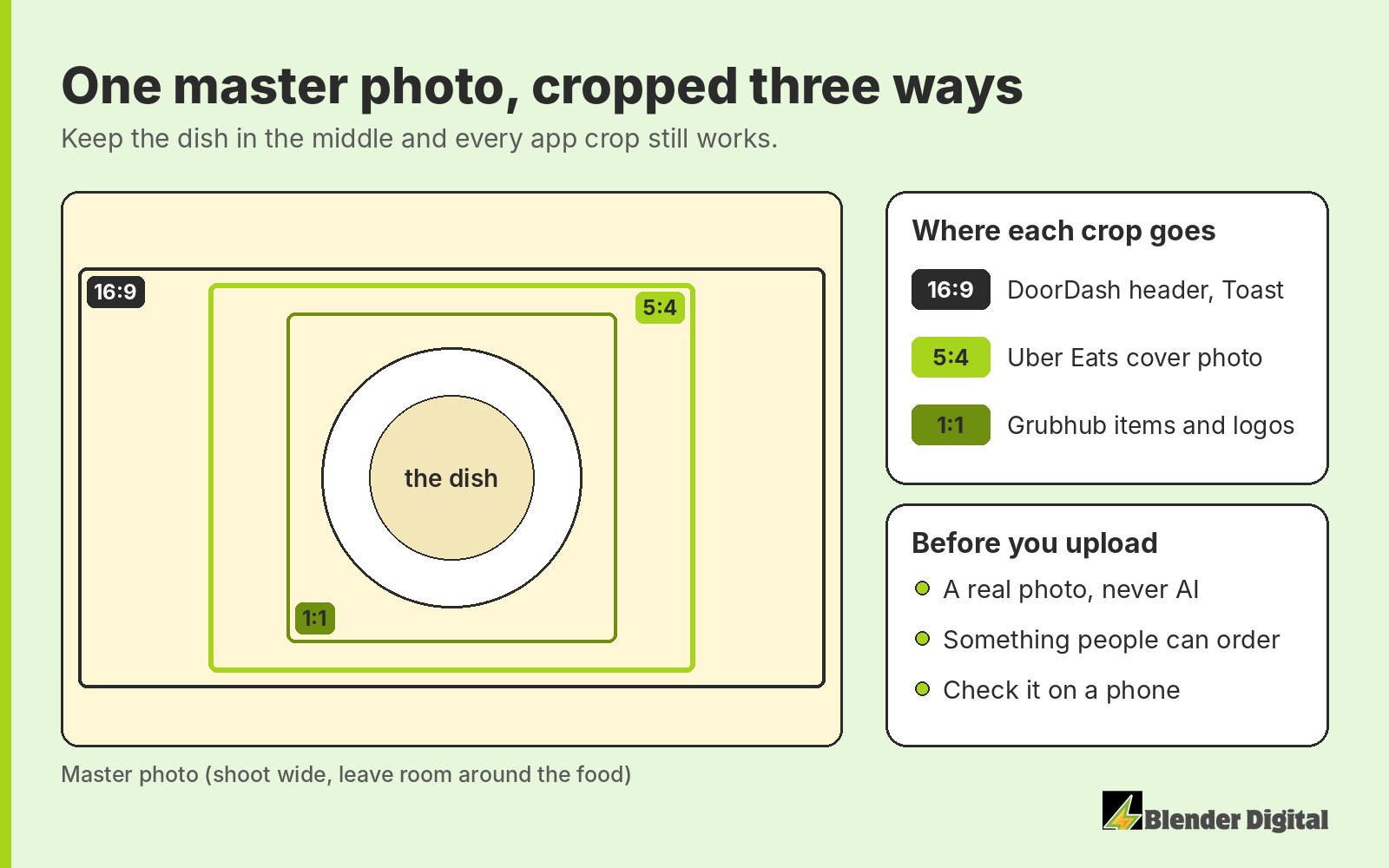
Both DoorDash and Uber Eats show the hero at different crops in the app and on the web. If the food sits near an edge, one of those versions will cut it off. Keep the dish centered and leave space on all sides.
To get each version to the right size, you can use our free food delivery image resizer. If you used DoorDash's free photographer, check the files before you upload them anywhere else. They tend to come back in inconsistent sizes.
What should be in the photo?
Food people can order. Uber Eats asks for a cover that's centered, level, and representative of products customers can actually buy, and it doesn't want branding overpowering the food. DoorDash is fine with a scene or a spread of a few dishes for the header, but it rejects tiled collages.
And it has to be a real photo. The platforms ban AI food photos and they detect them. A regular picture, even if it's not the best quality, goes much further than trying an AI one.
Do you need a professional photographer?
Not necessarily. Coverage matters more than perfection, and a decent, well-lit real photo does the job. DoorDash does offer a free photographer, which is worth taking up, as long as you check the file sizes afterwards.
One thing I wouldn't do is move to DoorDash's Premier plan for the photo credit. Premier is 30% commission, and most of its extras are a marketing trick. For most stores I recommend Plus at 25%.
Common hero image mistakes
- An AI-generated image. It can get flagged, and it doesn't show your actual food.
- Food pushed to the edge. One of the crops will cut it off.
- A collage. DoorDash rejects tiled collages for the header.
- A logo or text taking over. Uber Eats doesn't want branding overpowering the food.
- Only checked on a laptop. People order on their phones, so judge it there.
Can you add a video or Instagram to your DoorDash store?
Yes. DoorDash lets you connect your Instagram and add a header video to the storefront. I recommend both. It's free space on the page, so use it.
Is the hero image more important than menu photos?
No, you need both. A great header on top of a menu with no item photos still loses orders. Aim for photos on 90 to 95% of your items, and check them on a phone. On DoorDash, items without a photo can't even go on a BOGO. More on that in the delivery menu mistakes that cost you orders.
Photos are part of the audit we do in the first two weeks with every new client, along with campaigns, reviews and errors. If you'd like me to look at yours, get in touch.
FAQ
What size is the DoorDash header image?
1400 × 800 px minimum in a 16:9 shape, under 2 MB. DoorDash crops it differently in the app and on desktop, so keep the food near the center.
What size is the Uber Eats cover photo?
2880 × 2304 px, a 5:4 ratio, as a JPEG. Keep the dish centered because Uber shows it at different crops on the app and the web.
Can I use AI-generated food photos on DoorDash or Uber Eats?
No. The platforms ban AI food photos and detect them. A plain real photo works better.
Can my DoorDash header be a collage?
A scene or a spread of a few dishes is fine, but DoorDash rejects tiled collages.