
Are you struggling to tell which items people actually order on the apps? Is your delivery menu twice as long as it needs to be? Do your best in-store sellers do nothing on delivery? Is your BOGO sitting on an item nobody wants, or one that loses money every time it sells?
I got into this business through a coffee shop my cousin and I started, and delivery was the hard part from day one. A coffee doesn't carry that well, and neither do baked items. What sells at the counter and what sells in a bag are two different lists.
This post shows you where to pull item-level sales on each app and in Toast, how to find your long tail, how to spot items that travel badly, how to check photo coverage where it counts, and how to decide which items carry your promos.
Quick answers and quick fixes
- Don't know your top items? On DoorDash, go to Reports, then Create report, then Product Mix. In Toast, use Reports, then Menus, then Product mix, filtered by order source.
- Menu too long? Sort 90 days of item sales from high to low and find where the running total hits 90%. Most of what's below that line can come off the apps.
- An item keeps getting complaints? Check Uber Eats' lowest-rated items and your error charges by item.
- Best sellers missing photos? Fix those first, then work toward a photo on 90 to 95% of items.
- BOGO on the wrong item? Move it to a popular item with a margin of 75% or more that's quick to make.
- Drinks or pastries not moving? Bundle them with food instead of selling them alone.
Where do I find item-level sales on each app?
DoorDash. In the Merchant Portal, open Reports, click Create report and choose Product Mix. It covers item sales and which items are marked popular, for any range in the last two years, and you can run it once or on a schedule. For a quick look, open Insights and the Product Mix tab, which shows your most popular items with date and location filters (DoorDash learning center).
Uber Eats. Uber Eats Manager shows your top-selling items on the Sales page. Depending on your version, Uber's guides put it under Performance or Analytics, then Sales (Uber Eats academy). The Menu item tab shows your highest and lowest-rated items and the most common issues, and the Operations view lists the items customers most often receive incorrectly (Uber Eats Manager guide).
Toast. If your apps run through Toast, this is often the easiest full list. Go to Reports, then Menus, then Product mix. Under More filters, set Order source to your delivery apps so you're only looking at those orders. You can also compare two periods side by side (Toast support).
Pull at least a full month. I ask new clients for 90 days of item sales, because one month can be skewed by a promo or a holiday.
How do I find my long tail?
The long tail is the stack of items that sell a few times a month. Each one looks harmless. Together they push your best sellers further down the screen, and on a phone that costs you orders. I want best sellers, bundles, drinks and add-ons where a thumb finds them in three seconds.
Here's how to find the tail yourself in a spreadsheet:
- Export 90 days of item sales from the Product Mix report.
- Sort by sales, highest first.
- Add a running total column and divide it by total sales, so each row shows its cumulative share.
- Find the row where the share crosses 90%. Everything above it is your core menu. Everything below it is the tail.
- Go through the tail one item at a time. Keep anything that's really an add-on, a drink that goes with a best seller, or something your regulars ask for. Bundle what you can. Hide the rest on the apps.
Hide it on the delivery menu only. If you're on Toast, a separate online-only menu lets you trim the apps without touching what the cashier rings up. The setup is in how to build a separate Toast menu for DoorDash and Uber Eats.
One warning before you publish. Editing items in your POS can change their IDs on DoorDash and quietly break item-level promos. Make menu changes on a Monday, rebuild those campaigns right after, and don't change prices in the same week, or you won't know which change moved the numbers.
Which items travel badly, and how do I find them?
Some food just doesn't survive the bag. Coffee and baked items are the ones I learned on. Anything that goes soggy, cold or messy in 20 minutes will show up as low ratings and refunds, no matter how good it is at the counter. Then there are items that need explaining and get misordered, and items too thin to survive commission. Chips and salsa looks cheap to make, but once you count packaging the margin drops to about 66%.
Your own data will point at them:
- Uber Eats' lowest-rated items and "most common issues" on the Menu item tab.
- Uber's list of items customers most often receive incorrectly.
- Error charges by item. On DoorDash they're under Financials, then Transactions.
- Your low reviews. If you log them by item, the same names keep coming back. (My routine for that is in how to keep track of your reviews.)
For each one, you can repackage it, pair it with something that travels well, or take it off the apps. For coffee shops, pairing usually wins. A drink is always associated with a cake or a sandwich, so package them.
Do your best sellers have photos?
Photo coverage is the share of your menu items with a photo. Count items with a photo, divide by total items, and aim for 90 to 95% or more. It's an online medium, and you have to have pictures in order to sell items. Coverage matters more than perfect photos.
Go down your product mix list in order and photograph the top sellers first. On DoorDash a missing photo also makes the item ineligible for a BOGO, so your best item can't carry your best offer. Use real photos, never AI ones, and check them on a phone. Our free food delivery image resizer exports the sizes each app wants.
Which items should carry the promo?
The product mix tells you what's popular. Your food cost tells you what you can afford to give away. For each candidate, I put four numbers in a table: units sold, price, food cost, and what a BOGO pays you.
Payout per BOGO = (price × payout ratio) − (2 × food cost)
At a 50% payout ratio, nachos at $13.20 with $2.20 of food cost pay $6.60 minus $4.40, so $2.20 per BOGO. A chicken bowl at $15.40 with $5.30 of cost pays $7.70 minus $10.60, so you lose $2.90 every time. That's why my rule is a margin of 75% or more for BOGO items, plus popular and quick to make. If a popular item fails the test, raise its app price or turn the premium part into a paid add-on, since add-ons are never discounted. The BOGO profit calculator runs this on your own numbers.
Example: map every item into one of four boxes
Once you have orders and margin for each item, the decisions get simple.
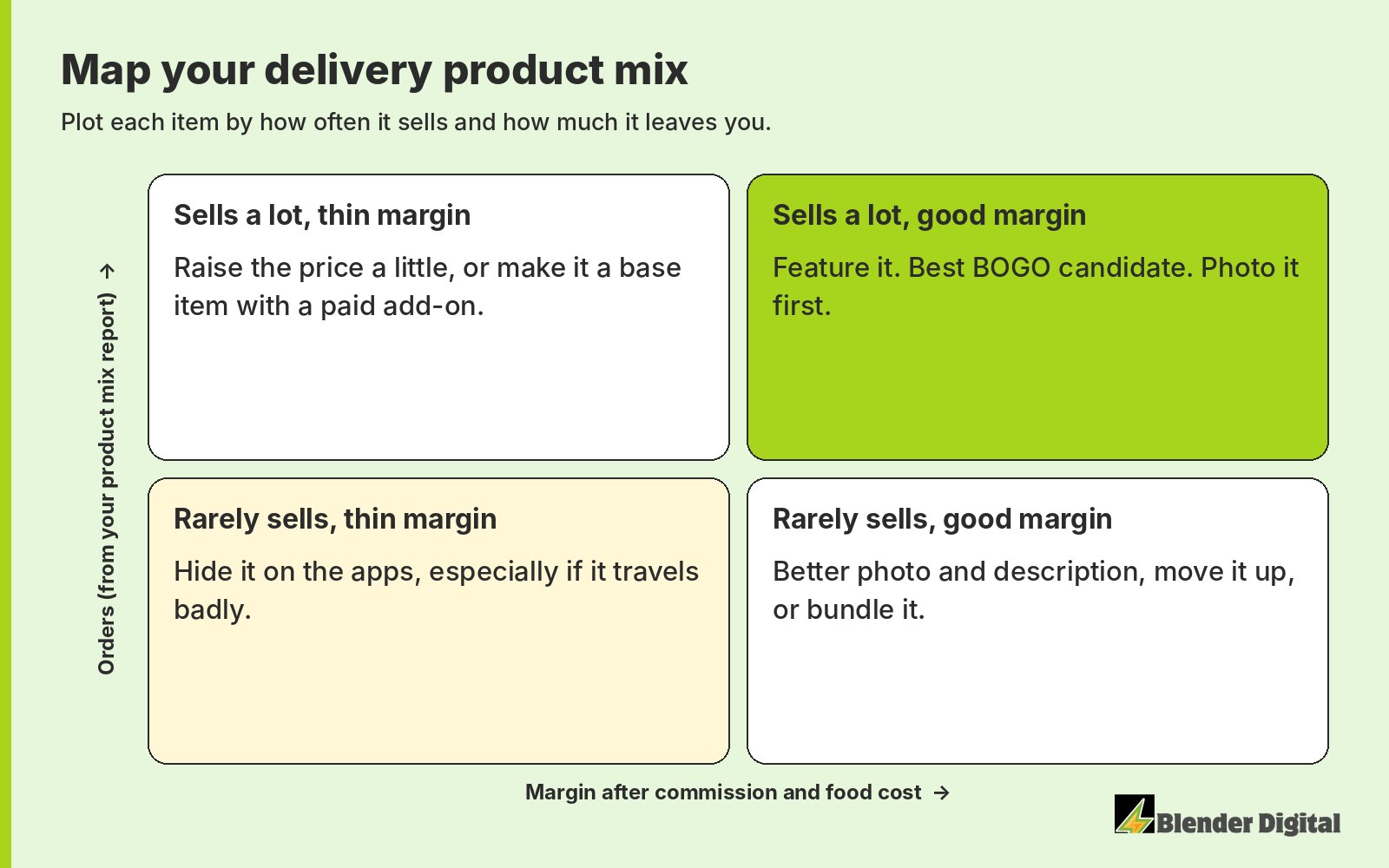
The top-right box gets your photos, your best spot on the menu and your BOGO. The bottom-left box is your long tail, and most of it can go.
How does Blender handle the product mix?
Every engagement starts with a two-week audit, and the menu is part of it. We ask for 90 days of item sales, food cost on the top 15 to 20 items and the photos you have, then run every BOGO candidate through the payout math before it goes live. Then we keep adjusting as the data comes in. That work sits inside our campaign strategy, and the weekly upkeep is part of campaign management.
A few of the changes that came out of it, without names. At an artisan bakery and café in Philadelphia, we moved the drink BOGO from lattes, which are expensive to give away, to refreshers. At a smash-burger ghost kitchen in Houston, we put the BOGO on the single instead of the double, so customers add patties at full price, and rebuilt loaded fries with a required protein choice, paid option first. In advisory work for a Mexican QSR in New York, raising prices, running fewer BOGOs and adding a free-item offer to lift the ticket took the payout ratio from about 48% to 52 to 54%.
The menu is one part of a full plan, so I won't credit it alone. But the Philadelphia bakery's delivery sales went from $2,814 in January to $9,234 in April 2026 across Uber Eats and DoorDash, and it hit all three of its monthly goals.
If you want a second pair of eyes on what's actually selling, Blender's here to help. Book a free 30-minute call and bring your last 90 days of item sales.
FAQ
How do I see my best-selling items on DoorDash?
In the Merchant Portal, open Reports, click Create report and choose Product Mix. For a quick view, open Insights and the Product Mix tab, which shows your most popular items by date and location.
How do I see item sales on Uber Eats?
Uber Eats Manager shows top-selling items on the Sales page, under Performance or Analytics depending on your version. If your orders run through Toast, the Product mix report filtered by order source gives a fuller list.
How many items should my delivery menu have?
There's no set number. Sort 90 days of item sales and find where the running total reaches 90% of sales. Most items below that line can come off the apps.
What food doesn't travel well for delivery?
Anything that goes soggy, cold or messy in the bag. In my experience coffee and baked items are hard on their own. Check your lowest-rated items and error charges by item to find yours.
What share of my delivery menu needs photos?
Aim for 90 to 95% of items or more, starting with your best sellers. On DoorDash, items without a photo can't be put on a BOGO.