
Yes, your DoorDash and Uber Eats menu should be different from your in-store menu, and on Toast that means a second menu built only for the apps. Most owners I talk to have one menu in Toast with a 10, 15 or 20% markup switched on in the integration settings, and that same menu syncs to DoorDash, Uber Eats and Grubhub. It's quick to set up, but it marks up every item by the same amount, whether that item sells on the apps or not.
My rule for every restaurant on third party: run two menu setups. One is built for the counter. The other is built only for the apps and priced by hand. Below is why, what the prices look like side by side, and how to set it up in Toast without breaking your promos.
Should my DoorDash menu be different from my in-store menu?
Yes. On the apps, the thing you're always solving for is how much money ends up in your pocket. Commission takes 15 to 30% before you run a single promo. With no promos at all, restaurants keep about 70 to 85 cents on the dollar. Add BOGOs, ads and the $0.99 fee on every redeemed offer, and about 50 cents is normal while you're growing.
So the app menu has one job: keep as much of every order as you can. In practice that means bigger tickets. A soda and a side on their own barely leave anything after commission and packaging. You want the menu to steer people toward meals, add-ons and the items that hold their margin.
A separate menu gives you room to do that. You can set each price yourself, build meals that don't exist at the counter, turn premium ingredients into paid add-ons, and set up substitutions. That matters most once you run buy-one-get-one, which you'll need to sell well on these apps. How the menu is built decides what the BOGO gives away.
Which items to cut, bundle or move up is its own topic, and I covered it in why your delivery menu shouldn't be a copy of your in-store menu. This post is about the setup and the pricing.
Why doesn't a blanket markup work?
A blanket markup raises a can of soda by the same percentage as a chicken bowl. The prices stop reflecting which items can actually sell on the apps.
Take a $2.50 soda. At 15% it's $2.88. At 20% it's $3.00 for a can, and the customer still has delivery fees coming on top. So the drink doesn't get added. Drinks and sides are the easiest way to grow a ticket, and a blanket markup prices them out first.
It gets worse when someone has already raised prices by hand. Toast's third-party settings have an "Increase menu price" option that adds a percentage or a fixed amount, and Toast's help center says it applies on top of the base price on your menu. Price that soda at $2.99 by hand, leave a 20% increase switched on, and DoorDash shows $3.59. A global percentage stacking on manual prices is one of the first things I check on a new Toast account.
Modifiers are the other catch. Per Toast, the DoorDash increase applies to all item prices except modifiers. The Uber Eats setting can apply to items, modifiers or both, and Toast warns that a flat amount on cheap modifiers can produce unexpectedly high prices. So one "simple" markup can price your paid protein differently on each app.
None of this would matter much if customers didn't notice. They do. "The first thing people look at is price. Picture comes second, description comes third."
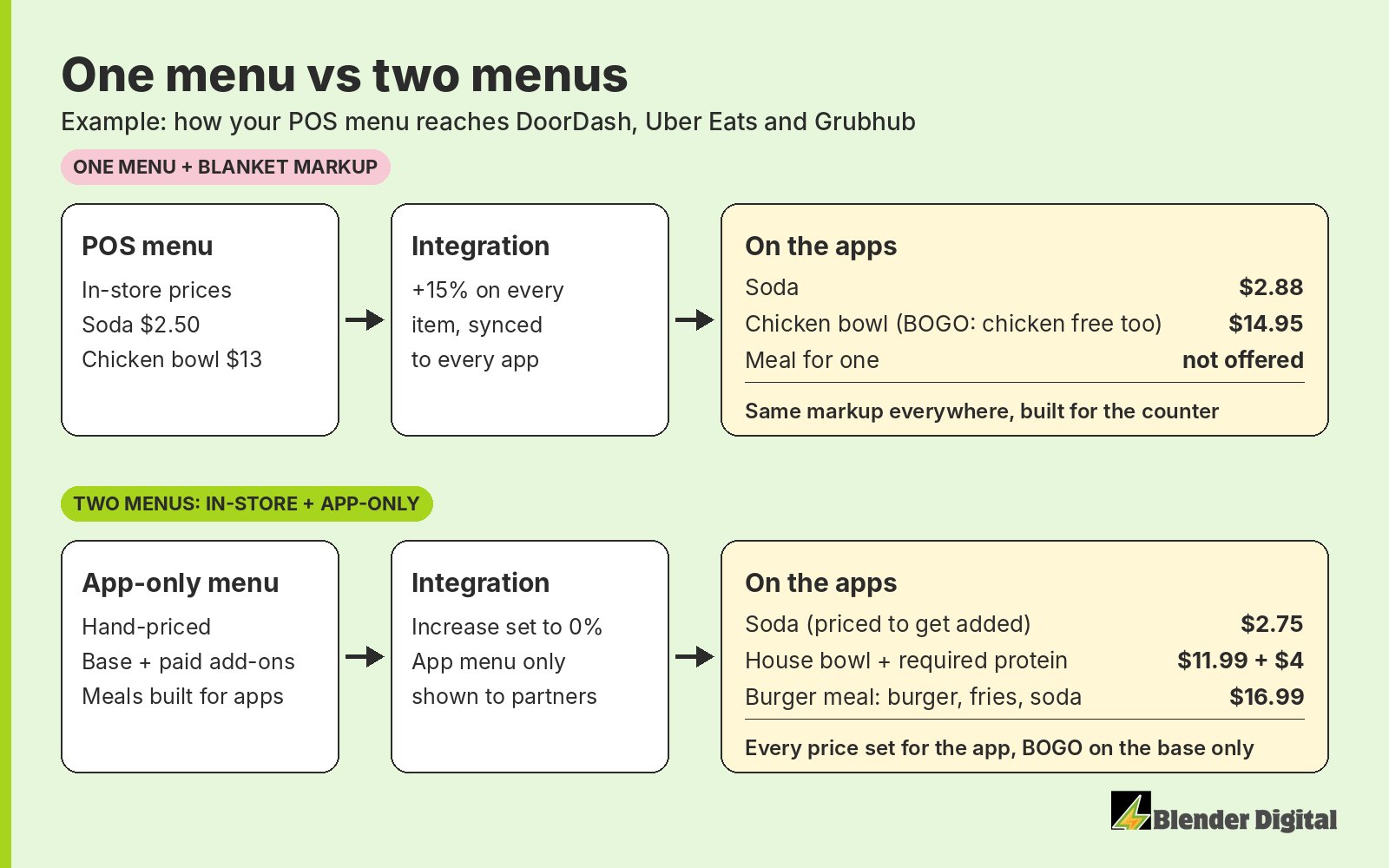
What does a hand-priced app menu look like?
Here's a simple example. The prices are made up for illustration, but this is the shape I aim for.
| Item | In-store | One menu, blanket +15% | App-only menu, priced by hand |
|---|---|---|---|
| Canned soda | $2.50 | $2.88 | $2.75 |
| Fries | $4.00 | $4.60 | $4.99 |
| Cheeseburger | $9.00 | $10.35 | $10.49 |
| Chicken bowl | $13.00 | $14.95 | House bowl $11.99 + required chicken $4.00 = $15.99 |
| Extra guac (modifier) | $2.00 | $2.00 on DoorDash (increase skips modifiers) | $2.50 |
| Burger meal (burger, fries, soda) | Not on the menu | Not on the menu | $16.99 |
Some items go up more than 15% and some less. The soda stays close to the counter price so it gets added. Fries carry more because people don't shop around on fries. The burger meal only exists on the apps, and it turns a $10.49 burger order into a $16.99 one. The bowl gets split into a base and a paid protein, which is where the money is when a BOGO is running.
| Blanket menu | App-only menu | |
|---|---|---|
| Two bowls in the cart | $29.90 | 2 × ($11.99 + $4.00) = $31.98 |
| BOGO discount | −$14.95 | −$11.99 |
| Customer pays (before fees and tax) | $14.95 | $19.99 |
| What you gave away | A whole bowl, chicken included | One base bowl. Both proteins paid in full |
Add-ons are never discounted on a BOGO, so the customer pays full price for the part that costs you the most. The way I explain it to owners: "$12 bowl, you click on it, at a minimum you have to add a $4 add-on." Everybody who's figured out BOGO on these apps does some version of this. More on that in how I set up BOGOs that protect margin.
How much should the app menu be marked up overall?
Across the menu I aim for 12 to 15%, set item by item. Getting fully back to your in-store money at a 30% commission takes about a 43% markup, so a $10 item becomes $14.30. You would never mark something up by 43%, so it has to land somewhere in the middle. A 10% markup is technically hurting you. The full math is in why a 30% markup doesn't cover a 30% commission, and you can run your own items through the markup parity calculator.
How do you set up a separate third-party menu in Toast?
This is the setup as Toast's help center describes it, plus what we do on client accounts. Toast changes its screens often, and some pages are still rolling out (Toast says the Uber Eats configuration page is in limited release). If what you see doesn't match, check with your Toast rep or the integration's support before you publish anything.
- Make a deep copy of your in-store menu. Toast's own third-party pricing article starts here. A deep copy duplicates the items and modifiers, so none of them stay linked to the original. A regular copy keeps modifiers shared, so a change can show up on both menus.
- Set the visibility. The app menu should be visible to "Online ordering partners," and the in-store menu shouldn't be. Toast lets you set visibility at the menu, group, item or modifier level, and children inherit from parents: hide a menu or group from a channel and everything under it is hidden too.
- Point each app at the new menu. In Toast Web, go to Takeout & delivery, then Third-party ordering, then Menu settings next to DoorDash (or Uber Eats), then Edit. Add the app menu from the "Add menu" drop-down and remove the in-store one. Only menus set to "Online ordering partners" show up in that drop-down. Each app has its own page, so you can send a different menu to each one if you need to.
- Price it by hand. Change prices on the copy, item by item. Toast's Price editor (Menus, then Bulk management, then Price editor) handles item prices in bulk. Modifier prices are edited on their modifier group's page. For Grubhub, Toast points you to the Price editor, since there's no Grubhub pricing page in the same place.
- Check the "Increase menu price" setting. If you've priced by hand, make sure this isn't adding a percentage on top. That's the stacking problem from earlier.
- Stage it, then publish. Publishing in Toast pushes every pending change live at once, not just yours. We save menu changes and leave them unpublished until the owner has looked them over.
- Check the live store and rebuild item campaigns. Open the store on your phone inside your delivery zone, check a few prices, and recreate any item-level BOGOs straight away. The next section explains why.
Keep the app menu simple enough to sync. Toast's integration limitations page says nested modifiers should only go two layers deep, empty modifier groups and empty menu groups can cause sync issues, and some partners don't show subgroups, so Toast flattens them. Toast's DoorDash setup article adds that DoorDash may not pull a menu at all if it uses time-specific pricing, pre-modifiers, subgroups, prompt for quantity or size pricing on modifiers. A clean app-only menu is easier to keep inside those lines than a counter menu with years of add-ons built into it.
What's the downside of running two menus?
You have to set prices by hand, and you have to keep them current. That's the real cost. A deep copy doesn't follow your in-store menu, so when you raise counter prices, the app menu stays where it was until someone updates it. Put it on the same checklist.
I think that's a fair trade. A blanket markup is easy because it doesn't make any decisions, and the prices show it. Here's what else to watch once you're running two menus:
- Item IDs can change. Editing items in Toast can change their IDs on DoorDash and silently break item-level campaigns. I learned this very expensive lesson early on. The BOGO campaign just went flat. Make menu changes on a Monday, never right before a busy weekend, and recreate item campaigns right after you publish.
- There's no change log. Toast is one of the most convoluted pieces of software I've ever seen, and it has no menu change log. Keep your own note of what changed and when, or you won't be able to explain a dip later.
- The sync runs one way. Per Toast, DoorDash pulls your menu from Toast, and after setup all menu changes are made in Toast Web. Photos you upload in DoorDash can be overwritten by a later sync. Toast also compresses images, so for the items that matter we upload straight to each app and check them again after every publish.
- 86'd items don't always come through. Toast's limitations page says the ordering partner controls whether 86'd items appear. When you 86 something, check the apps.
- Change one thing at a time. If the menu and the prices change in the same week, you won't know which one moved the numbers.
Not on Toast? Square, Clover and middleware
The idea is the same on any system: give the apps their own prices instead of one blanket percentage. What changes is how much control the integration gives you.
- Square. Square's DoorDash setup article lets you keep prices the same or raise them with a price override for each menu you select, and item changes sync to DoorDash automatically. That override still sits on top of your Square prices, so ask Square or DoorDash what item-level control your setup allows.
- Clover. DoorDash's Clover integration article says Clover prices carry over automatically, changes come from your Clover online menu, and the integration supports a single DoorDash menu. Different DoorDash prices go through a separate price adjustment step.
- Middleware. DoorDash's pricing article shows Otter, Chowly, Checkmate and Deliverect can each run DoorDash-specific prices or a separate menu version. If you run several brands out of one kitchen, middleware is usually where we'd build the app menus.
FAQ
Can Toast send a different menu to DoorDash than my in-store menu?
Yes. Set the app menu's visibility to "Online ordering partners," then add it on each app's page under Takeout & delivery, Third-party ordering. Each app can get its own menu, and your in-store menu stays as it is.
Does Toast's "Increase menu price" setting apply to modifiers?
Per Toast's help center, on DoorDash it applies to all item prices except modifiers. On Uber Eats it can apply to items, modifiers or both. Either way it's added on top of the menu's base price, so it stacks with any prices you've already raised by hand.
Will changing my Toast menu break my DoorDash promotions?
It can. Editing items can change their IDs on DoorDash, and item-level campaigns like a BOGO can go flat without any warning. Make changes on a Monday and recreate item campaigns right after you publish.
How much should I mark up a third-party menu?
I aim for 12 to 15% across the menu, set item by item. Full parity at a 30% commission takes about a 43% markup, which customers won't pay, and 10% is usually too thin.
When we take on a store, the app menu is part of the first two weeks: a profitability pass on each item from the cost sheet, a hand-priced app-only menu, and every change staged in Toast until the owner signs off. If you want a second pair of eyes on yours, send me your menu and your last full month from each app, and I'll tell you where I'd start. Get in touch here.