
When an owner asks me whether DoorDash or Uber Eats is worth it, what they usually mean is: once the apps take their cut, is there anything left? It's the right question to ask before signing up. With no promos and no ads, restaurants keep about 70 to 85 cents of every dollar they sell on the apps. While you're running offers to grow, about 50 to 58 cents is normal.
For most restaurants the apps are still worth having, as long as you go in knowing what each cost is and price your menu for it. Below is every cost to plan for, the one to plan for first, and a calculator that shows how far your app prices need to move for an order to pay you what it would at the counter.
Quick answer
- Delivery apps are worth it for most restaurants as a way to reach new customers, but they will be your least profitable channel.
- Commission is the biggest cost and it comes out of every order: 15%, 25% or 30% on DoorDash and 20%, 25% or 30% on Uber Eats, depending on the plan.
- Promos, a roughly $0.99 fee on each offer order, ads and error charges come on top while you're growing.
- To get paid the same as in-store at a 30% commission, a $10 item has to sell for $14.29, a 42.9% markup. I usually mark up 15–20% and make up the rest with how the menu is built.
- The free menu markup parity calculator shows the app price you'd need for any item, at any commission rate.
Are delivery apps worth it for a new restaurant?
For most restaurants, yes. DoorDash and Uber Eats are where people who have never heard of you decide what to eat tonight. Your counter and your own website mostly reach people who already know you. That reach is what the commission pays for.
The trade-off is margin. However well a store is run, the apps keep a share of every order, so a delivery order will usually pay you less than the same order at the counter. That's expected. What you want to avoid is a setup where each order loses money once food and packaging come out, and that comes down to three decisions you make before going live: your commission plan, your app prices, and how much you plan to spend on promos and ads.
What does it cost to sell on DoorDash and Uber Eats?
These are the costs a new store should expect. Commission is always there. The others depend on how hard you push for growth.
| Cost | What it is | Typical amount |
|---|---|---|
| Commission | A percentage of each delivery order, set by your plan | DoorDash 15%, 25% or 30%. Uber Eats 20%, 25% or 30%. |
| Pickup commission | A percentage of orders the customer collects | About 6% |
| Promo discounts | BOGOs, percentage-off and spend-and-save offers that you fund | Your choice, usually highest in the first months |
| Offer fee | A flat fee on each order placed with an offer | About $0.99 per order |
| Ads | Sponsored listings in search and the home feed | I start around $3 a day on Uber Eats and a $3 bid per order on DoorDash |
| Error charges | Refunds charged back to you for missing or wrong items | Varies with how clean the kitchen runs. One prospect lost $1,198 in a month across two stores. |
| Tablet | DoorDash's order tablet, if you use it | $6 a week after the trial |
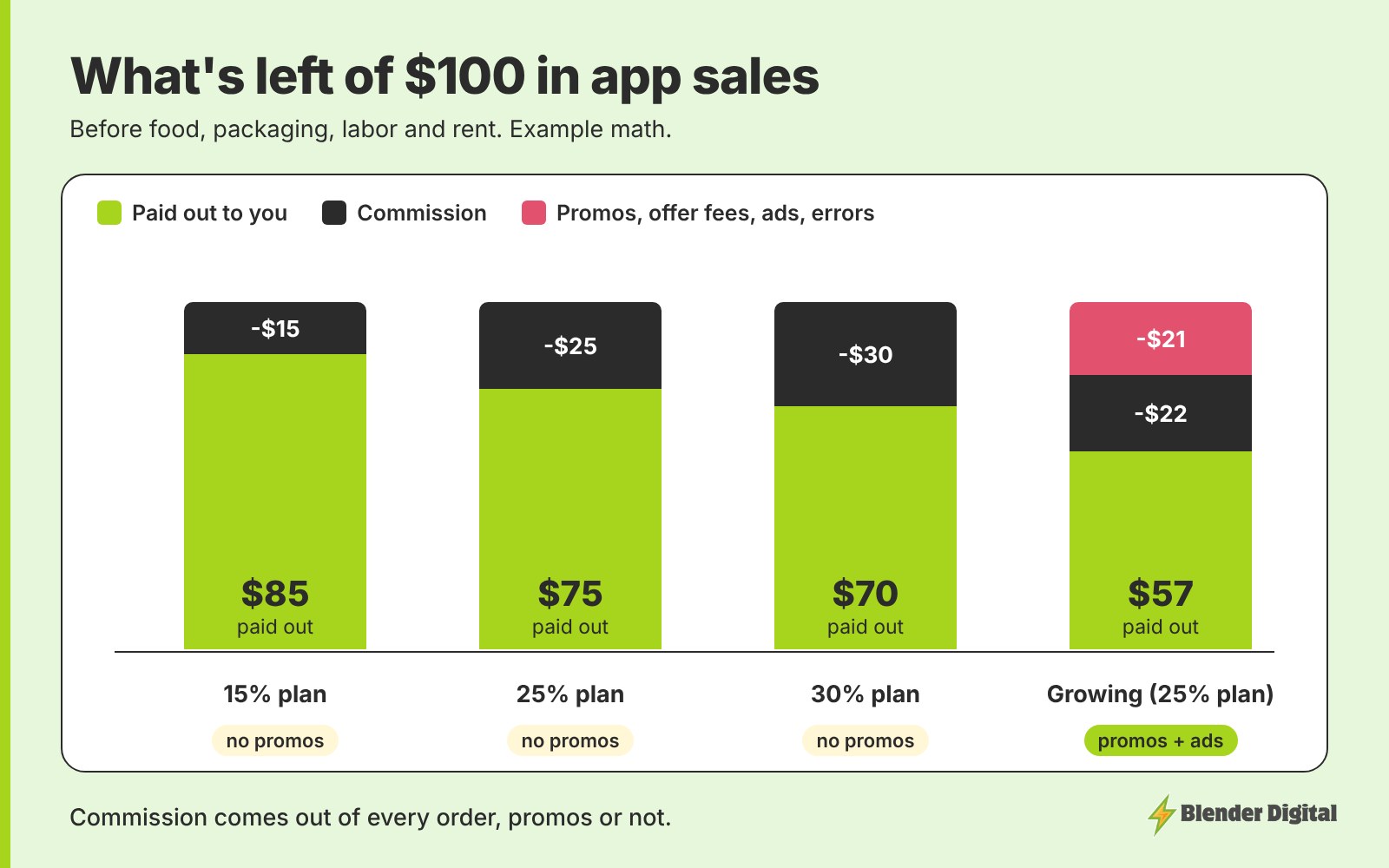
Food, packaging, labor and rent all come out of what's paid out, not out of the $100. I go through each line on a real statement in the true cost of selling on DoorDash and Uber Eats, and the plan rates in how much DoorDash and Uber Eats charge restaurants.
Which cost should you plan for first?
Commission. Promos and ads are dials you can turn up or down each week. Commission comes out of every order from the first one, at a rate your plan sets. On a 25% plan, a $20 order pays you $15 before a single promo runs.
So it's the cost to plan around before you sign up, and you have two ways to handle it. The first is the plan itself: on DoorDash I usually recommend Plus at 25%, and reps will often negotiate a premium plan down. I compare the options in DoorDash Basic vs Plus vs Premier. The second is your app prices. If they match your counter, the full commission comes straight out of your margin on every order.
How much do you have to raise app prices to get paid the same as in-store?
Divide your in-store price by the share you keep after commission. On a 25% plan you keep 75%, so a $12 item needs to sell for $12 ÷ 0.75 = $16.00 on the app. That's a 33.3% markup. The rule of thumb: parity price = in-store price ÷ (1 − commission).
| Commission | You keep | App price for a $10 item | Markup needed |
|---|---|---|---|
| 15% | 85% | $11.76 | 17.6% |
| 20% | 80% | $12.50 | 25.0% |
| 25% | 75% | $13.33 | 33.3% |
| 30% | 70% | $14.29 | 42.9% |
A common mistake is setting the markup equal to the commission. A 30% markup on a 30% plan leaves you $9.10 on a $10 item, because the commission is charged on the higher app price.
Should you mark up all the way to parity?
Usually not. A 33 to 43% markup makes your store look expensive next to the restaurants around you, and price is the first thing people read on a delivery menu. For most restaurants I aim for 15–20% over in-store and close the rest of the gap with how the menu is built:
- Keep the comparison items close to in-store. The dishes people search for and compare across restaurants carry less markup. Drinks, sides and add-ons can carry more.
- Make the premium part a paid add-on. Keep the base dish near its normal price and charge for the protein or the extra patty.
- Charge for modifiers. Extra sauce, extra protein and bigger sizes should all cost something on the apps.
- Give the apps their own menu. A separate online-only menu lets you set each app price by hand instead of applying one blanket percentage.
I explain the full reasoning in how much to mark up menu prices on DoorDash and Uber Eats. For setting each price, see how to price your menu on DoorDash and Uber Eats, and for spreading the markup across the menu, flat or tiered delivery markup. Before you set prices, it also helps to see what restaurants near you charge for the same dishes on the apps. If you'd like that done for you, the free competitor analysis compares similar restaurants within about four miles on prices, offers, ratings and photos.
Do you need promos and ads to make the apps worth it?
If you want to grow, yes, at least at the start. A new store has no reviews and no order history, so the apps show it less, and an offer gives people a reason to try you. I treat promo and ad spend as the cost of finding new customers, not as a discount on every order. A few rules keep that spend in check:
- Put BOGOs on high-margin items. I only run them on items with a food margin of 75% or better, with the expensive part kept as a paid add-on. The BOGO profit calculator checks this item by item.
- Aim offers at new customers. A BOGO open to everyone pays the discount and the offer fee on your regulars too.
- Start ads small. Scale only when the return holds up. My starting budgets are in how much to spend on DoorDash and Uber Eats ads.
- Expect payout to dip while you grow. Around 50 cents on the dollar is normal during a push. If you're down in the 20s or 30s, something needs fixing.
How to decide if delivery apps are worth it for your restaurant
This is the order I'd work through before signing up:
- Pick your likely plan and write down its commission rate.
- Price your top five sellers. Run each one through the markup parity calculator and choose an app price, usually 15–20% over in-store.
- Check each item still covers its food and packaging at that price after commission. If a best seller doesn't, change the item (portion, add-on, bundle) before you launch.
- Set a first-month promo and ad budget and think of it as the cost of new customers.
- After one full month, run the payout-per-order test in is DoorDash worth it for restaurants to see whether it's paying off.
If those numbers hold up, the apps are worth it. If they don't, the fix is usually pricing and menu structure rather than leaving the apps. For which app to start with and which plan to choose, see should a new restaurant join DoorDash, Uber Eats or Grubhub, and for the launch itself, your first 30 days on DoorDash and Uber Eats.
FAQ
Are DoorDash and Uber Eats worth it for small restaurants?
For most, yes, as a way to reach customers who don't know you yet. Expect to keep about 70 to 85 cents per dollar with no promos and about 50 to 58 cents while you're growing, so price the app menu for the commission before you launch.
How much do DoorDash and Uber Eats take from restaurants?
Commission is 15%, 25% or 30% on DoorDash and 20%, 25% or 30% on Uber Eats, depending on your plan. Pickup orders run about 6%. Promo discounts, a roughly $0.99 fee on each order placed with an offer, ads and error charges come on top.
How much should I mark up my menu on delivery apps?
Usually 15–20% over in-store. Getting paid the same as in-store takes a 33.3% markup at a 25% commission and 42.9% at 30%, which makes most menus look expensive next to nearby restaurants. Close the rest of the gap with paid add-ons, charged modifiers and a separate app menu.
How do I work out my delivery app price?
Divide the in-store price by (1 minus the commission). A $12 item on a 25% plan needs to sell for $16.00 to pay you $12. Blender Digital's free menu markup parity calculator does this for any price, commission rate or payout ratio.
Should I skip the apps and only use my own online ordering?
Use both. Your own online ordering keeps more of each sale, but it mostly reaches people who already know you. The apps are where new customers find you, and you can move regulars to your own ordering over time.
If you're about to sign up and want a second opinion on your plan and prices, send me your menu and I'll tell you where I'd start. Get in touch here.