
Most owners pick one markup number for the whole delivery menu: 10%, 15%, maybe 20%. It's quick, but it marks up a can of soda by the same percentage as your best-selling bowl, and it says nothing about whether the menu as a whole is covering enough of the commission.
The approach I'd use instead is tiered: sort the menu into a few groups, give each group its own markup, then check the overall number weighted by what actually sells. You get the result of pricing item by item without pricing a hundred items from scratch. Here's how to set the tiers, how to check the blended markup, and when to revisit it.
Quick answer
- A tiered markup gives dishes people compare the smallest increase, core mains a moderate one, and sides, extras and add-ons the largest. App-only bundles get priced on their own.
- Aim for 15–20% across the whole menu, weighted by sales. A simple average of item markups overstates it when your best sellers carry the lowest markup.
- Full parity takes a 33.3% markup at a 25% commission and 42.9% at 30%. The free menu markup parity calculator shows the number for your plan.
- Revisit the markup when your commission changes, when in-store prices change, and after your first full month on the apps.
Should you use a flat markup or price each item?
Price by item, but you don't need to start from a blank page for every line. A flat percentage treats every item the same, so drinks and small sides get priced out first and the dishes people compare get pushed up as far as everything else. On Toast, a global markup can also stack on top of prices you've already set by hand. I go through those problems with a side-by-side example in a separate Toast menu for DoorDash and Uber Eats.
Tiers are the middle ground. You make a handful of decisions instead of one, and every item lands in a group that reflects how customers shop it.
How do you sort a menu into markup tiers?
Go through the menu and put each item in one of these groups. The markups are an example starting point, not fixed rules. Adjust them to your plan and to what restaurants near you charge.
| Tier | What goes in it | Example markup |
|---|---|---|
| Comparison dishes | Your signature item and the dishes people search for and compare across restaurants | Lowest, around 10–15% |
| Core mains | The rest of your entrées | Around 15–20% |
| Sides, extras and add-ons | Fries, chips, sauces, extra protein: things nobody shops around on | Highest, around 20–25% |
| Canned and bottled drinks | Easy adds that grow the order | Close to in-store, so they keep getting added |
| App-only bundles | Meals that don't exist at the counter | Priced on their own, with no counter price to compare against |
To decide which dishes go in the first tier, check what the restaurants near you charge on the apps. I explain how in how to price your menu on DoorDash and Uber Eats.
How do you check the overall markup on your menu?
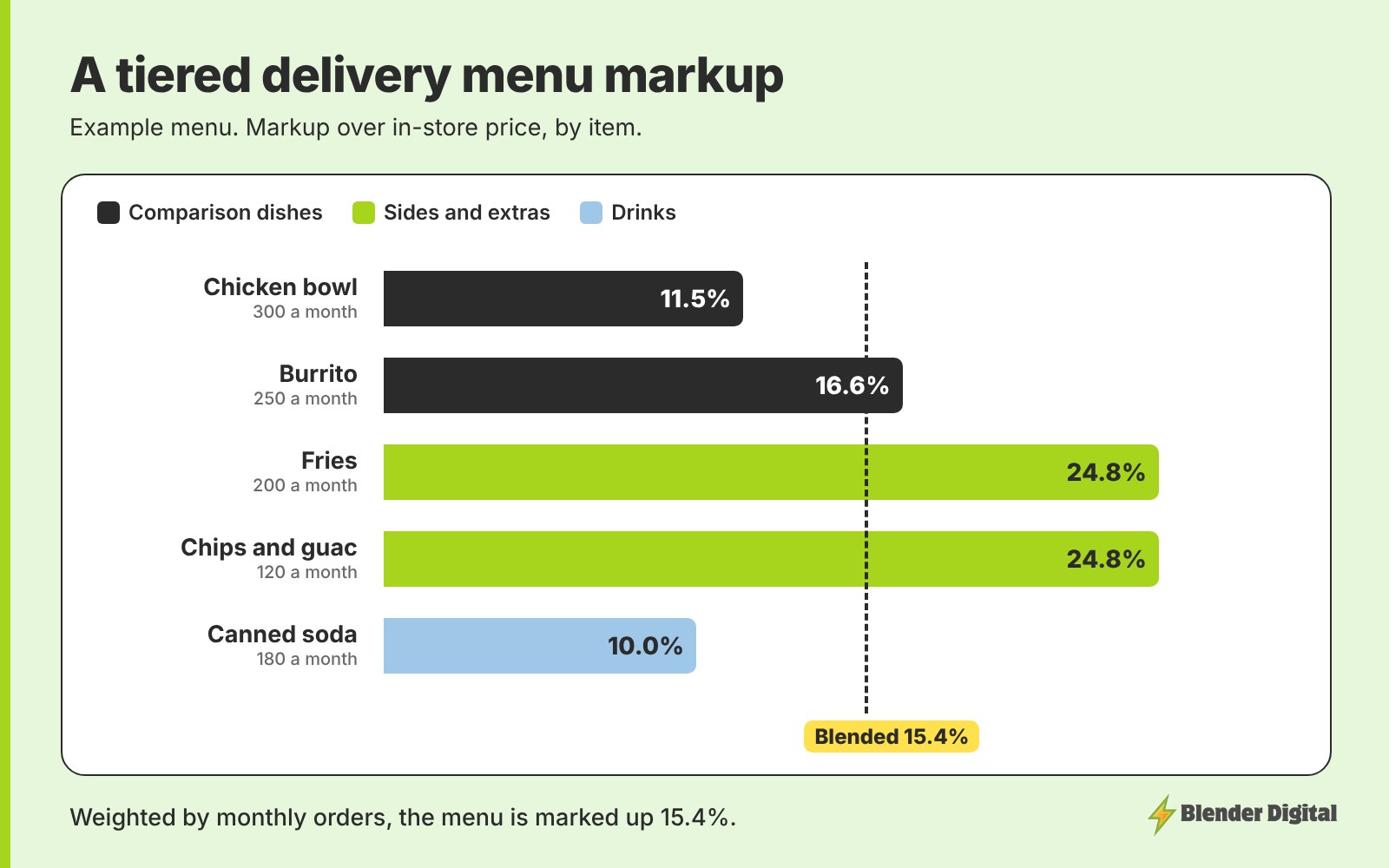
Weight it by sales. Multiply each item's in-store price and app price by how many you sold last month, add each column up, and compare the totals. Here's an example for five items:
| Item | In-store | App price | Markup | Sold per month |
|---|---|---|---|---|
| Chicken bowl | $13.00 | $14.49 | 11.5% | 300 |
| Burrito | $12.00 | $13.99 | 16.6% | 250 |
| Fries | $4.00 | $4.99 | 24.8% | 200 |
| Chips and guac | $6.00 | $7.49 | 24.8% | 120 |
| Canned soda | $2.50 | $2.75 | 10.0% | 180 |
| Total | $8,870 | $10,236 | 15.4% |
The menu is marked up 15.4% overall, inside the 15–20% range. A simple average of the five markups would say 17.5%, which overstates it, because the chicken bowl sells the most and carries one of the smallest markups. If your blended number comes in under about 15%, the tiers to nudge are usually sides and add-ons, not the comparison dishes.
How much markup would cover your commission?
Full parity is in-store price ÷ (1 − commission). That's a 17.6% markup on a 15% plan, 33.3% on 25% and 42.9% on 30%. A 15–20% blended markup won't reach parity on most plans, and it isn't meant to. It narrows the gap without making the store look expensive, and menu structure does the rest.
Compare the parity markup for your plan with the blended number from the step above. The gap between them is the part of the commission your menu structure and offers have to cover.
Should your markup change when you run promos?
Not much. When BOGOs and ads are running, restaurants keep about 50 cents on the dollar, and the price that would make up for that is roughly double the in-store price. The full calculator has a payout ratio setting that shows this. Nobody should price for it. Promo spend is the cost of finding new customers, so judge it on the customers it brings in rather than trying to recover it through menu prices.
What does change is how the promoted items are built. Put the BOGO on a base item and keep the expensive part as a paid add-on, since add-ons are never discounted. An item on a BOGO can also carry about $1 more, because customers rarely notice a small increase on something they're getting two of. The BOGO profit calculator checks whether a given item can carry the offer.
When should you revisit your delivery markup?
- When your commission changes. Moving from a 30% plan to 25% takes full parity from 42.9% to 33.3%, which gives you room to bring the comparison dishes down.
- When in-store prices change. A separate app menu doesn't update with the counter menu, so a price increase in-store needs to be copied across by hand.
- After your first full month. Look at which items actually sell on the apps and re-weight the blended markup on real numbers.
- When nearby restaurants move. If competitors cut prices or add BOGOs on the dishes people compare, your first tier is the one to look at.
Make one change at a time and give it a full month. If prices and the menu change in the same week, you won't be able to tell which one moved the numbers. For the reasoning behind the 15–20% target, see how much to mark up menu prices on DoorDash and Uber Eats.
FAQ
What is a good markup for DoorDash and Uber Eats?
Around 15–20% across the menu, weighted by sales. Full parity takes 33.3% at a 25% commission and 42.9% at 30%, which makes most menus look expensive next to nearby restaurants.
Should I use the same markup on every item?
No. A flat markup prices drinks and small sides out first and pushes up the dishes people compare. Group items into tiers: comparison dishes lowest, core mains in the middle, sides and add-ons highest, drinks close to in-store.
How do I calculate my overall delivery menu markup?
Multiply each item's in-store and app price by last month's quantity, add up each column, and divide the app total by the in-store total. Subtract 1 to get the blended markup.
Should I raise prices to cover promos and ads?
No. While promos and ads are running you keep about 50 cents per dollar, and covering that would take roughly a 100% markup. Treat promo spend as customer acquisition and build promoted items as a base plus paid add-ons instead.
Is there a delivery markup calculator?
Yes. Blender Digital's free menu markup parity calculator shows the markup needed to get paid the same as in-store at any commission rate or payout ratio.
If you'd like a second opinion on your markup, send me your menu and last month's item sales from each app, and I'll show you where I'd set the tiers. Get in touch here.