
Owners usually set their DoorDash and Uber Eats prices one of two ways. They copy the counter menu, or they switch on a percentage markup and move on. The first hands the full commission to the apps on every order. The second can price your best sellers out of the race with the restaurant down the street.
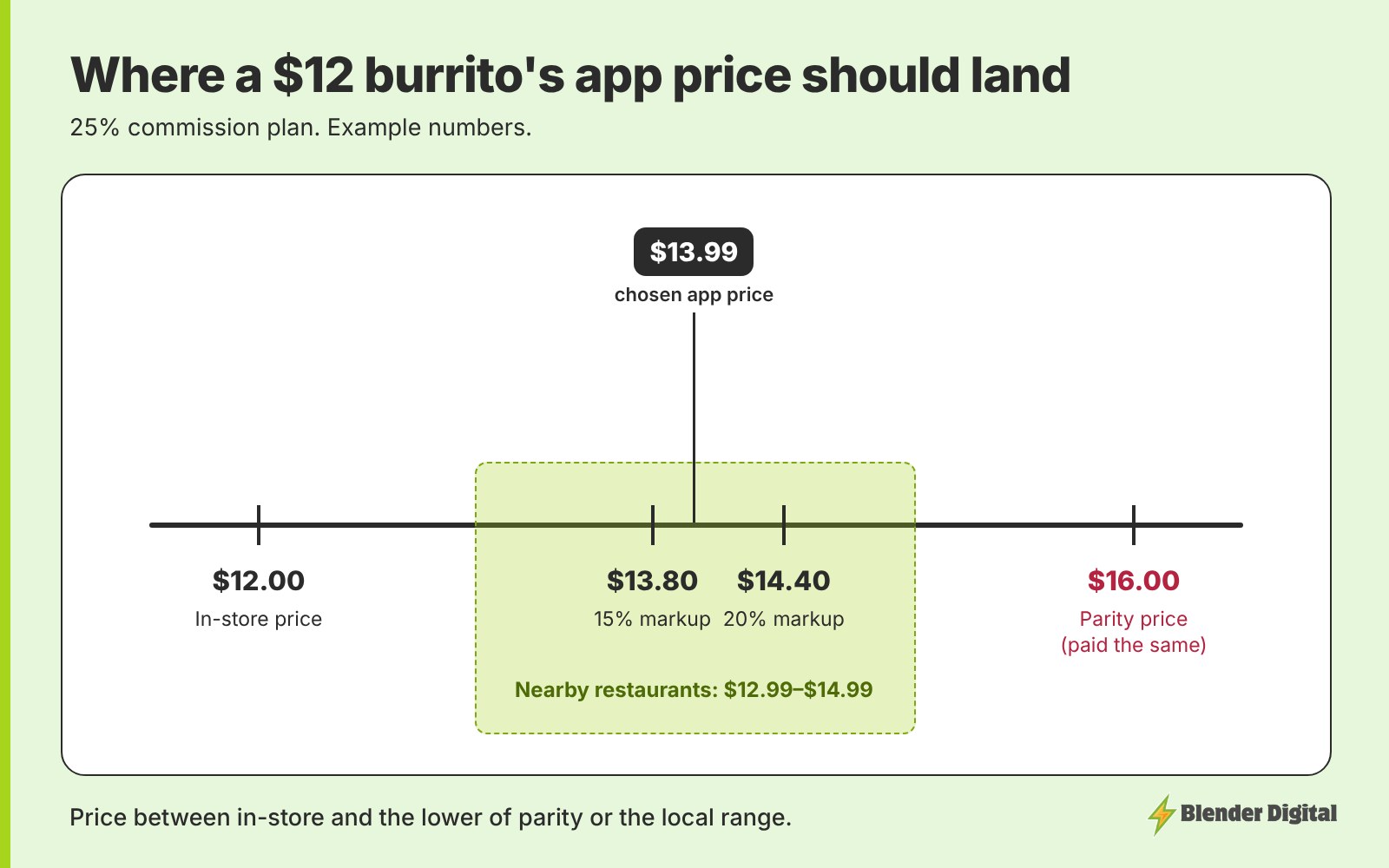
A better way is to price each item against two numbers: what you'd need to charge to get paid the same as in-store, and what restaurants near you charge for the same dish. Your app price sits between your in-store price and the lower of those two. Below is how to find both numbers, which items to keep close to in-store, and how to raise prices without the menu looking expensive.
Quick answer
- Price each app item between your in-store price and the lower of two numbers: your parity price and what nearby restaurants charge for the same dish.
- Parity price = in-store price ÷ (1 − commission). On a 25% plan, a $12 item needs $16.00 to pay you $12. The free menu markup parity calculator does this for any item.
- Most menus land at 15–20% over in-store overall. Keep the dishes people compare closer to in-store and let sides, extras and app-only bundles carry more.
- Price is the first thing customers read on a delivery menu, so the headline price on your best sellers matters more than any other number.
What should decide your DoorDash and Uber Eats prices?
Two reference points, worked out item by item.
- Your parity price. The app price that pays you the same as a walk-in sale once commission comes out. It tells you how much of the commission you're absorbing on that item.
- The local price. What similar restaurants within a few miles charge for the same kind of dish on the apps. It tells you how far you can go before customers pick someone else.
For most dishes the parity price is higher than the local price, so the local price is the real limit. You won't cover the whole commission on those items, and that's fine. The rest of the gap gets closed elsewhere on the menu, which I come back to below.
How do you work out the parity price for each item?
Divide the in-store price by the share you keep after commission. On a 25% plan you keep 75%, so a $12 burrito needs to sell for $12 ÷ 0.75 = $16.00. On a 30% plan it's $17.14. Most owners are surprised by how high that number is, which is exactly why it's worth seeing for your own best sellers.
Run your top five or ten sellers through it and write the parity price next to each one. You won't charge that, but it shows which items lose the most to commission at your current price.
How do you check what restaurants near you charge?
Open DoorDash and Uber Eats on your phone, the way a customer would, and set the address to your restaurant.
- Pick 5 to 10 similar restaurants within a few miles. Same cuisine or same kind of meal, not just whoever ranks first.
- Choose the 3 to 5 dishes people compare. For a Mexican spot that might be a burrito, a chicken bowl and tacos. For a burger shop, a cheeseburger and a meal.
- Write down each price and whether the item has a BOGO or discount tag on it. A $14 burrito with a BOGO reads very differently from a $14 burrito without one.
- Note the range, low to high, for each dish. That range is your local price.
I walk through the full check in how to compare yourself to competitors on DoorDash and Uber Eats. If you'd rather have it done for you, the free competitor analysis compares similar restaurants within about four miles on prices, offers, ratings and photos.
Which items should stay close to your in-store price?
The items customers compare across restaurants, and the items that make an order bigger.
- Comparison dishes. Your signature item and the dish people search for by name. These are the prices customers actually check, so they get the smallest markup.
- Canned and bottled drinks. A drink is the easiest add to an order. Price it too far above the counter and it stops getting added.
Everything else can carry more: sides, sauces, extra protein, and dishes nobody shops around on. Most customers don't compare the price of fries across five restaurants. If you want a simple way to sort a whole menu this way, I lay out a tiered method in flat or tiered delivery markup.
How do you raise app prices without looking expensive?
Customers read a delivery menu in a set order: price first, then the photo, then the description. So the goal is a fair-looking headline price on the items people compare, with the extra margin sitting where it's less noticeable.
- Split the dish into a base and a paid add-on. A $11.99 house bowl with a required $4.00 protein reads better than a $15.99 chicken bowl, and the protein is never discounted when a BOGO runs.
- Charge for modifiers. Extra sauce, extra protein and larger sizes should cost something on the apps.
- Build app-only bundles. A burger meal that only exists on the apps has no counter price to compare against, and it lifts the order size.
- Give similar items different prices. If a chicken bowl and a steak bowl are both $14, people stop to work out the difference. Price them to reflect what's in them.
- Let a BOGO item carry a little more. Customers rarely notice a small increase on an item they're getting two of. Raising it by about $1 before the BOGO launches is reasonable.
Keep in mind the customer still sees delivery and service fees on top of your prices at checkout. Your menu price is only part of what they pay, which is one more reason not to push the comparison dishes too far.
A simple pricing routine for your delivery menu
- List your top sellers with their in-store prices.
- Run each through the markup parity calculator at your commission rate and note the parity price.
- Check the local price range for the dishes people compare.
- Set each app price between your in-store price and the lower of the two. Comparison dishes and drinks low, sides and extras higher, bundles priced on their own.
- Check the overall markup lands around 15–20%, weighted by what actually sells.
- Publish on a Monday, then rebuild any item-level campaigns. If your menu comes from Toast, editing items can change their IDs on DoorDash and quietly break item promos.
- Change one thing at a time and give it a full month before judging it.
If your app prices come from Toast, set this up as a separate menu priced by hand. I cover the setup in a separate Toast menu for DoorDash and Uber Eats. For how much markup is enough overall, see how much to mark up menu prices on DoorDash and Uber Eats.
FAQ
How should I price my menu on DoorDash and Uber Eats?
Price each item between your in-store price and the lower of two numbers: your parity price (in-store price divided by 1 minus commission) and what similar restaurants nearby charge for the same dish. Most menus end up about 15–20% over in-store overall.
Should DoorDash prices be higher than in-store prices?
Usually yes. The commission comes out of every order, so matching your counter prices means absorbing all of it. Keep the dishes people compare close to in-store and put more of the markup on sides, extras and app-only bundles.
How do I find out what competitors charge on DoorDash?
Open the app with your restaurant's address, pick 5 to 10 similar restaurants within a few miles, and note the price of the 3 to 5 dishes customers compare, plus whether each one has a BOGO or discount tag.
Is there a calculator for delivery app menu prices?
Yes. Blender Digital's free menu markup parity calculator shows the app price needed to get paid the same as in-store for any item, at any commission rate or payout ratio.
If you want a second opinion on your app prices, send me your menu and your store link and I'll tell you which prices I'd change first. Get in touch here.