
Are you struggling to figure out why the place down the street gets the orders? Wondering if your prices are too high? Thinking about matching a competitor’s BOGO? Or did a new spot just open, and now you’re wondering whether to cut prices?
Most owners I talk to have never looked at their competitors the way a customer does. They know their own portal inside out and guess at everyone else. Then they cut a price that was already in line, or launch a BOGO into a market where every neighbor already runs nine of them.
Every engagement we take on starts with a look at the local competition. This post is the self-serve version: who to compare against, what to write down, how to read it, and what not to do when a new competitor shows up.
Quick answers and quick fixes
- Not sure who you compete with? List the stores within a set straight-line distance of yours, in your category and the ones people order instead.
- Think your prices are too high? Line up three to five comparable items side by side before you cut anything.
- Competitor runs BOGO on everything? Count the items, then check whether they sell a base item with paid add-ons.
- Their rating looks better? 4.5 or above with 100+ reviews is the bar. Work on reviews before price.
- They have more photos? Aim for 90% to 95% of your menu with a photo.
- New competitor opened? Don’t react on price. Look at them, then read a full month.
Why is it so hard to tell how I compare?
Because the apps show you your own numbers and almost nothing about anyone else’s. Uber Eats has a Market Benchmark that compares you with local peers, but it won’t tell you what the store two blocks over is discounting or charging.
The rep won’t either. Their suggestions are built around the platform’s revenue, not around the shop down the road. And most owners check their own store through a link or the merchant portal, which isn’t what a hungry customer sees when they open the app and scroll.
So you have to look yourself. The good news is that everything you need is public, on the same screens your customers use.
Who are my real competitors on DoorDash and Uber Eats?
Pick them by straight-line distance from your store, not by delivery time. Delivery time changes between lunch and 3pm, in the rain, and with how many drivers are out. A list built on it changes every time you look. Distance stays put.
- Set a radius. Tighter in a dense city, wider in the suburbs. Google Maps can measure straight-line distance. On a computer, right-click your store, choose Measure distance, and click the competitor.
- Search like a customer. Open DoorDash and Uber Eats on your phone with a delivery address near your store. Search your category (burgers, tacos, coffee) and scroll the home feed.
- Pick five to eight stores. Your direct category first, then the places a customer would order instead. A burger shop also competes with the chicken sandwich place two blocks over.
- Do it all in one sitting. Offers change by the hour, so check every store close together in time.
What should I check for each competitor?
Open each store page on your phone and write the same things down for every one, including your own store. A spreadsheet with one row per store is enough. Budget about five to seven minutes a store.
| Check | What to write down | Where to look |
|---|---|---|
| Distance | Straight-line miles from your store | Google Maps, Measure distance |
| Rating and reviews | The rating and the number of ratings | Top of the store page |
| Offers | How many items are discounted, which ones, what they cost, and whether they’re tagged popular | Offer banner and item tags on the store page |
| Price ladder | The price of three to five items comparable to yours | The menu |
| Menu build | Base item with required paid add-ons, or fixed items | Tap into a best seller and look at the required choices |
| Photo coverage | Items with a photo divided by total items | Scroll the full menu |
| Ads | Whether they show up as sponsored in your category or search | Home feed and search results |
| Fees and hours | Delivery fee, DashPass or Uber One, and when they’re open that you aren’t | Store header and hours |
Two tips. Tap into items rather than reading the menu list, because a base-and-build menu hides the real price in the required choices. And screenshot as you go. A few tight crops are worth more later than a pile of full-page captures.
How do I read what I found?
Read it in the order a customer does. “The first thing people look at is price. Picture comes second, description comes third.” Then trust.
Price. Compare like with like. If a competitor’s burger is $10 but a patty choice is required and the cheapest option adds $3, their real price is $13. If you’re in line with the neighbors on comparable items, look at the other checks before you touch price. If you want to check your markup against your own costs, use the markup parity calculator.
Offers. Count them. Nine BOGO items and one BOGO item are very different strategies. Then look at how they’re built. Competitors who’ve figured BOGO out put it on a base item and sell the premium part as a paid add-on, because add-ons are never discounted. That’s how they afford a BOGO on everything. If you copy the offer without the menu build, you’re giving away more than they are. I walk through the math in how I set up BOGOs that protect margin.
Rating. Look at the count as well as the stars. “If you have 1,000 reviews and a 4.2, that’s an average store. But if you have 150 reviews and a 4.5, that basically means customers are happy.” 4.5 or above with 100+ reviews is the trust milestone. If you’re behind on this one, it usually matters more than price. More in how ratings affect your sales.
Photos. If the neighbors have photos on most items and you have them on half, that’s the cheapest gap to close. “It’s an online medium, you have to have pictures in order to sell items.” Start with your best sellers.
Ads. If competitors show up as sponsored in your category, they’re paying for the top of the feed. Before you match them, fix the basics, since ads multiply whatever your store already is.
Hours. Delivery demand is occasion-based. If you’re closed on a night when nobody nearby is open either, that’s an opening.
A hyped competitor just opened. Should I cut prices?
Usually not. “Don’t react to just the competition moving in.” A busy opening brings more people to the apps in your area, and some of them end up ordering from you. That’s what happened at the Houston ghost kitchen. A competitor with a lot of buzz opened nearby, and the store had its best day ever from the overflow.
What to do instead:
- Run the same check on the new store. Write down its offers, prices, rating and menu build.
- Leave your prices and offers alone for a full month and read the results by month, not by day.
- If something does need to change, change one thing at a time so you can tell what worked.
Example: a one-hour competitor scorecard
Here’s what the finished check looks like for a burger shop and four neighbors. The numbers are made up, but the pattern is one we see often.
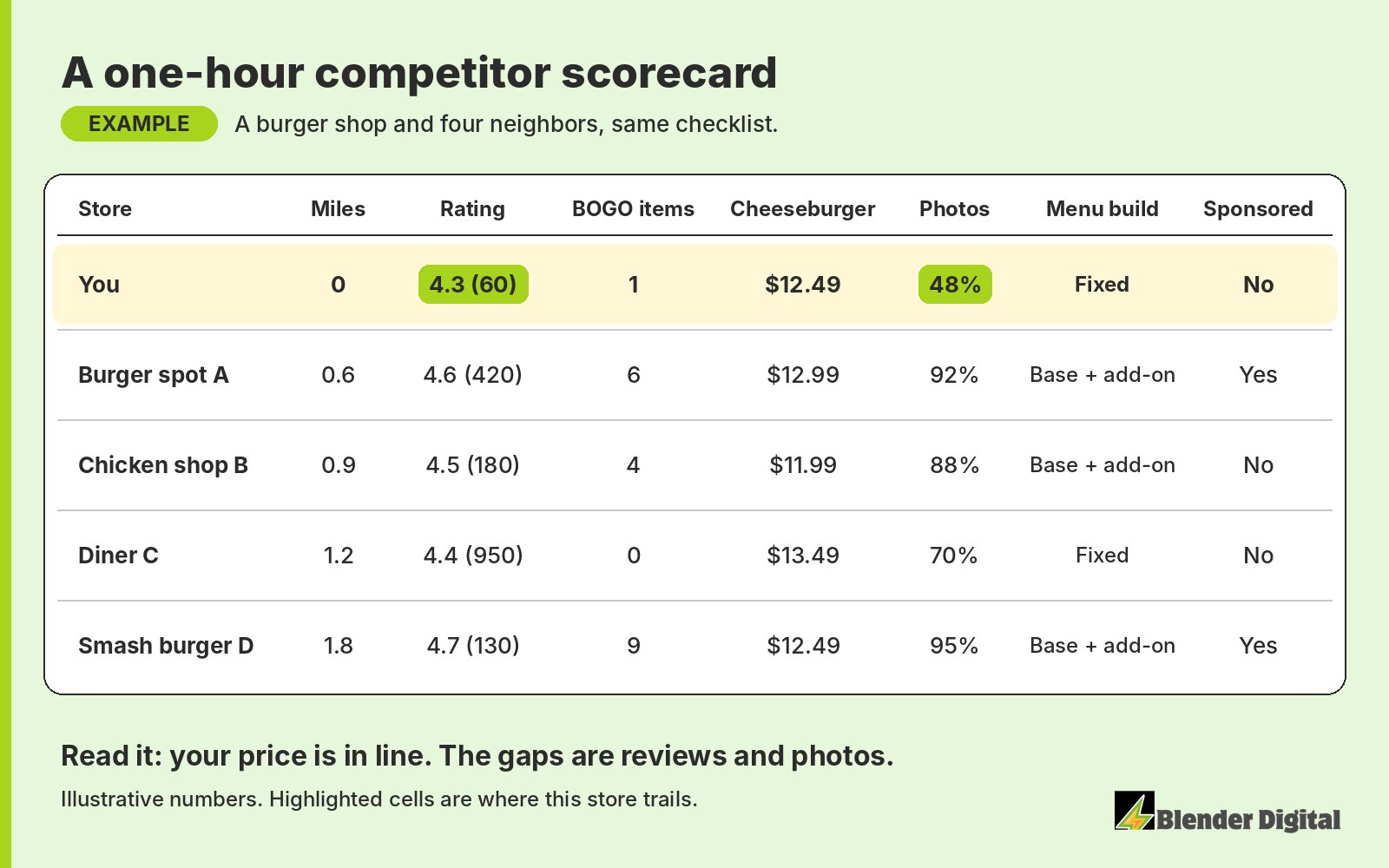
In this example the owner was about to cut the cheeseburger price. The scorecard says the price is fine. The store trails on review count and photo coverage, and it’s the only one running a BOGO on a fixed item. So the first moves would be a review push, photos on every item, and rebuilding the BOGO item as a base with a paid add-on.
How does Blender do competitor research?
The same way, in more depth, at the start of every program and again when the market shifts. We map competitors by straight-line distance, open every store page on a phone, and record offers, prices, menu build, ratings, photos, ads, fees and hours on the same checklist. You get a deck with a few tight screenshots, a positioning summary, and recommendations that only come after the research is done. Each one has an approval line. See our competitive research page for what’s included.
The findings go straight into the offers. For an Asian QSR in Maryland, the first offers came out of that market look, and in the first two weeks of the trial in September 2026, 32 of 35 BOGO orders came from new customers. Those offers are then run and measured as part of our campaign strategy.
If you’ve done the check and aren’t sure what it’s telling you, send it over. Blender’s here to help. Book a free 30-minute call and we’ll read it with you.
FAQ
How do I find my competitors on DoorDash and Uber Eats?
Open both apps on your phone with a delivery address near your store, search your category and scroll the home feed. Keep the stores within a set straight-line distance of yours, in your category and the places customers order instead. Five to eight is plenty.
Should I use delivery time or distance to pick competitors?
Distance. Delivery time changes with the hour, the weather and how many drivers are out, so a list built on it keeps changing. Straight-line distance from your store stays the same.
What should I compare on a competitor’s store page?
Rating and review count, how many items they discount and which ones, the price of three to five comparable items, whether their menu is a base item with paid add-ons or fixed items, how many items have photos, whether they show up as sponsored, their fees and their hours.
A new competitor opened near me. Should I lower my prices?
Usually not. Don’t react to just the competition moving in. A busy opening can bring more customers to the apps in your area, and one of our clients had its best day ever when a hyped competitor opened nearby. Look at the new store, then judge on a full month.
Can Blender do the competitor research for me?
Yes. Competitor research is part of every Blender Digital program. We do it at the start and again when the market shifts, and the findings go straight into your offers, prices, menu and photos.