
Almost every owner I work with has done this at some point: opened one order in the merchant portal, divided the payout by the order total, and seen something like 40%. It feels like the app kept more than half the sale. If that's what every order paid, delivery wouldn't be worth it.
It usually isn't what every order pays. A single order can pay anywhere from about 30% to 80% of its menu price, depending on what was attached to it. Here's why one order pays so much less than another, why the full month is the number to judge, and how to see both without working them out by hand.
Quick answer
- A low-paying order usually had an offer on it (a BOGO or dollars off), the roughly $0.99 offer fee, and sometimes a sponsored listing bid or a refund, on top of commission.
- Commission is charged on the discounted price, but the discount, fees and ad cost all come out of what you're paid, so one order can land around 40% while a regular order with no offer pays 70% or more.
- Orders average out over a month. In a growth phase with offers running, keeping about 50 to 58 cents per dollar is normal. Judge the channel on that, not on one order.
- The free Payout Ratio for Delivery Apps Chrome extension shows the ratio on each order and on your statements, so you can see both.
Why did this order pay so much less than the last one?
Because of what was attached to it. Commission is a percentage, so on its own it takes the same share of every order. The costs that swing from order to order are the ones tied to a specific order:
- An offer. A BOGO or dollars-off discount comes straight out of the sale. On a BOGO the customer still pays at least half, but the free item's price is gone.
- The offer fee. Each order placed with an offer carries a flat fee of about $0.99.
- A sponsored listing bid. DoorDash sponsored listings are paid per order, so an order that came through an ad carries your bid, $3 or more.
- A refund or error charge. If something was missing or wrong, the adjustment lands on that order.
- Stacked offers. On Uber Eats, a store offer and a promo code can both apply to the same order. DoorDash doesn't stack them.
- Plan details. Some Uber Eats plans charge extra on orders from Uber One members, so those orders pay a little less.
Flat costs like the offer fee and an ad bid also weigh more on a small order than a large one. A $0.99 fee is about 3% of a $35 order and about 7% of a $15 one.
What does a 40% order look like?
Here's the same $35 cart twice on a 25% DoorDash plan. The first is a regular customer with no offer. The second is a new customer who found the store through a sponsored listing and used a BOGO.
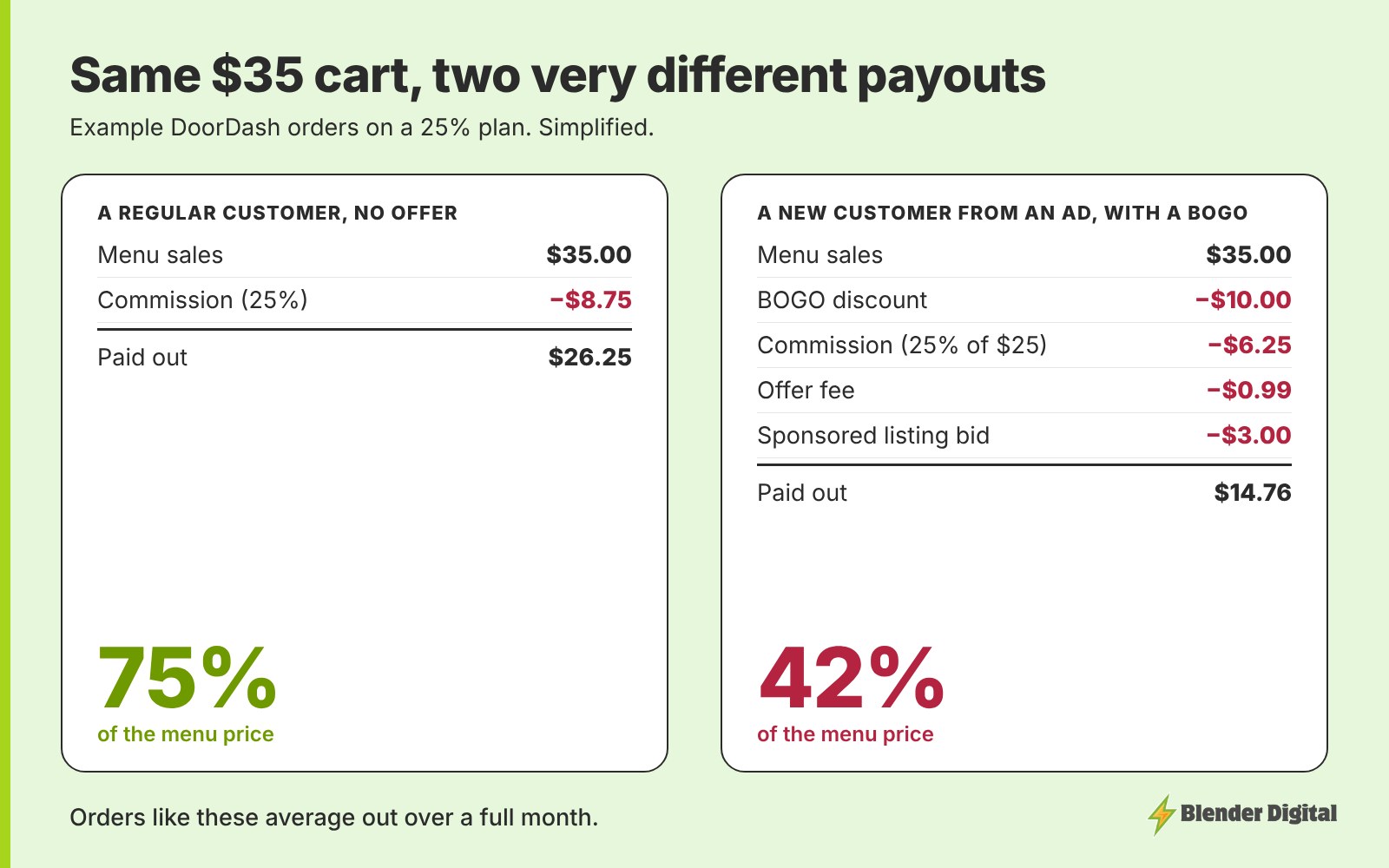
The second order paid 42% of its menu price. Nothing went wrong. That's what buying a new customer costs on one order, and it's the reason to aim offers at new customers rather than everyone. A regular who would have ordered anyway doesn't need the discount, the offer fee or the ad.
Why should you judge the full month instead?
Because the low orders and the high orders average out. In a month with offers running, some orders pay in the 30s and 40s and others pay 70% or more. What matters is where the whole month lands, and in a growth phase about 50 to 58 cents per dollar is normal. With no promos or ads, the ceiling is about 70 to 85 cents, depending on your commission plan.
Judging by single orders leads to bad calls: switching off an offer that's bringing in new customers because one order looked bad, or panicking over a slow day. Pick a full calendar month per app, divide what was paid out by what was sold, and decide from that. I explain the bands in how much delivery revenue you actually keep.
If the month itself is low, down in the 20s or 30s, that's when to dig in. The usual causes are offers open to every customer, two offers hitting the same customers, ads that aren't returning enough, or error charges nobody is disputing.
How can you see both without doing the math?
Working out the ratio order by order, then again for the month, across two or three apps, is exactly the kind of math that gets skipped. Our free Chrome extension does it on the pages you already open: order details, payouts and statements on DoorDash and Uber Eats, and the transactions totals on Grubhub. Ratios of 50.0% or higher show in green and lower ones in red, so you can spot a low order and then check the statement to see whether the month is fine.
Payout Ratio for Delivery Apps
Free Chrome extension. See the payout ratio on each order and on your statements in DoorDash, Uber Eats and Grubhub, color-coded green at 50% or higher.
What should you do about low-paying orders?
- Check who the offer is for. In steady state, a BOGO should go to new customers. Regulars can get a smaller spend-and-save. I lay out who gets what in which customers your promos should target.
- Put BOGOs on the right items. Items with a food margin of 75% or better, with the expensive part as a paid add-on. The BOGO profit calculator checks an item in a minute.
- Don't let offers overlap. On Uber Eats especially, give each group of customers one offer.
- Review error charges. Dispute the ones that aren't right instead of writing them off.
- Look at the month before changing anything. One bad order is not a reason to turn a campaign off.
FAQ
Why did my DoorDash order pay so little?
Low-paying orders usually had an offer attached, like a BOGO or dollars off, plus the roughly $0.99 offer fee, and sometimes a sponsored listing bid or a refund. Those come out on top of commission, so one order can pay around 40% of its menu price.
What percentage of an order does DoorDash pay restaurants?
It depends on the order. With no offer, you keep roughly 70 to 85% depending on your commission plan. Orders with offers, ads or refunds can pay much less. Single orders range from about 30% to 80%.
Should I judge DoorDash by single orders?
No. Orders average out over a month. Judge the channel on a full calendar month's payout divided by sales. While running offers to grow, about 50 to 58 cents per dollar is normal.
Is there a way to see the payout percentage on each order?
Yes. The free Payout Ratio for Delivery Apps Chrome extension from Blender Digital shows the payout ratio on DoorDash and Uber Eats order details, payouts and statements, and on Grubhub transactions.
If your monthly payout ratio looks low and you can't tell which orders are dragging it down, bring your last full month from each app to a free call and I'll show you where it's going.