
Every number you need is in the DoorDash, Uber Eats and Grubhub portals: sales, commission, promotions, ad spend, fees, adjustments and what was paid out. What the portals don't give you is the answer to the question most owners actually have, which is how much of each dollar they kept.
Getting there takes some math, and usually on more than one page. It's easy to do once. It's hard to keep doing every week across two or three apps, so most owners either skip it or do it on a single order, and a single order rarely tells the real story. Here's the math, what a good number looks like, and a free way to skip the math altogether.
Quick answer
- What you keep is your payout ratio: net payout divided by gross sales. If you sold $1,000 and were paid $570, you kept 57%.
- With no promos or ads, restaurants keep about 70 to 85 cents per dollar on DoorDash and Uber Eats, depending on the commission plan. While running offers to grow, about 50 to 58 cents is normal.
- The portals show sales and payouts but don't state the ratio, so you have to work it out, ideally for a full month rather than one order.
- The free Payout Ratio for Delivery Apps Chrome extension does that math on the merchant portal pages you already use.
How much am I actually keeping on DoorDash and Uber Eats?
Divide what was paid into your bank by what you sold. That share is your payout ratio, and it's the first number I look at on any account, because it already includes everything the apps take: commission, promotions, the fee on each offer order, ads, error charges and any adjustments.
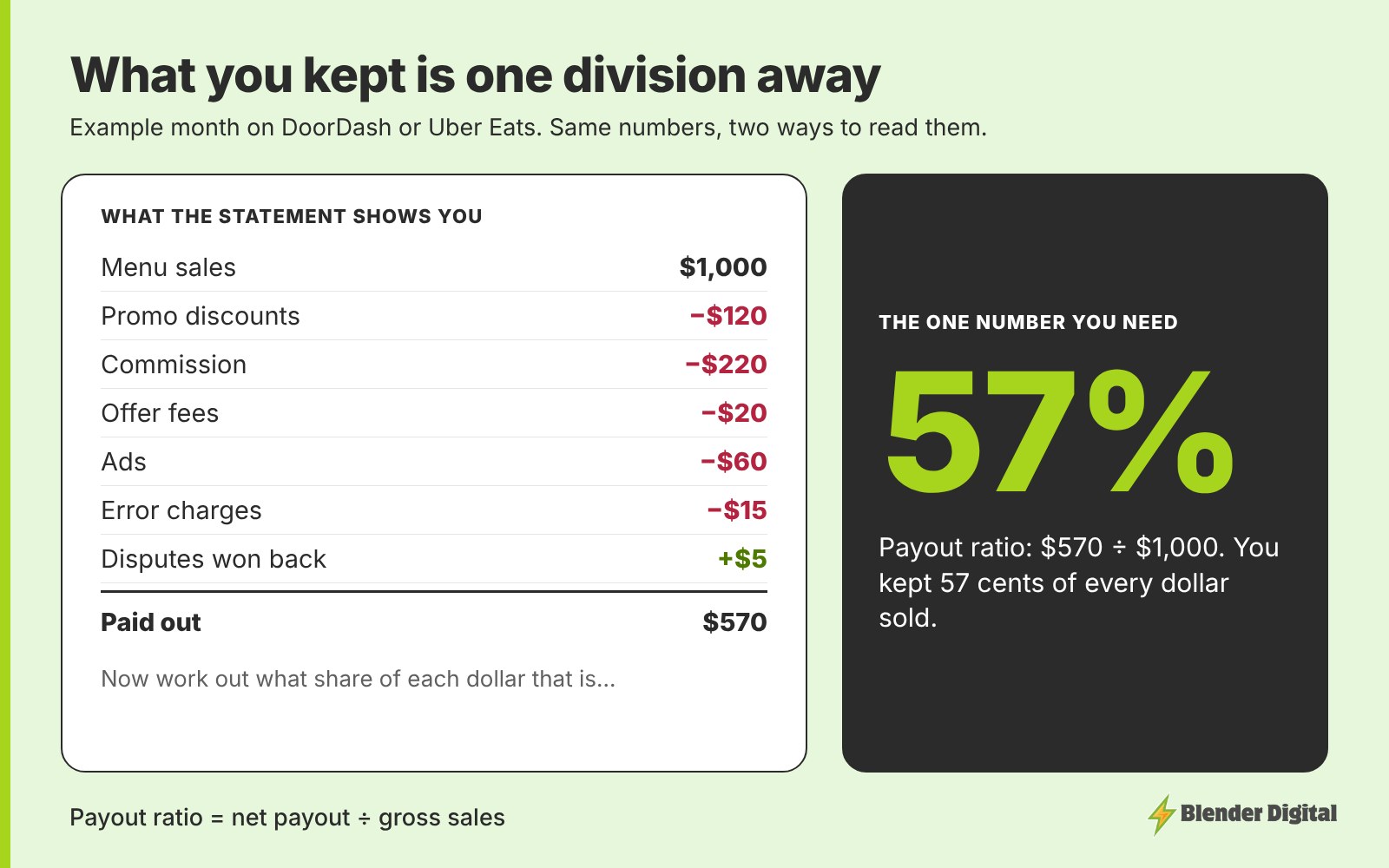
The same example month is broken down line by line in the true cost of selling on DoorDash and Uber Eats.
Why is it hard to see what you're keeping?
It isn't hidden. It's spread out, and it's never stated as one number.
- The pieces live on different lines and pages. Sales, discounts, commission, ad spend and adjustments each have their own line, and some sit on different screens from the payout itself.
- Payouts don't line up with months. Deposits land weekly or on their own schedule, so the numbers you see on one screen rarely cover the same period as the sales next to them.
- Each app shows it differently. DoorDash, Uber Eats and Grubhub use different layouts and labels, so the math has to be redone for each one.
- Single orders swing. One order can pay anywhere from about 30% to 80%, depending on the offer and the fees on it. Do the math on the wrong order and you'll think the whole channel is broken.
None of this is difficult on its own. It's just enough work that most owners stop doing it, and then the one number that tells them how the channel is going goes unchecked.
What payout ratio should you expect?
| What you're doing | What you typically keep |
|---|---|
| No promos or ads | About 70 to 85 cents per dollar, set mostly by your commission plan |
| Running offers and ads to grow | About 50 to 58 cents per dollar |
| Down in the 20s or 30s | Something needs fixing, usually stacked promos, unchecked ads or error charges |
A lower number isn't automatically bad. While you're buying new customers with offers, you'd expect it to dip, as long as the payout dollars keep growing. I explain each band in how much delivery revenue you actually keep.
How do you skip the mental math?
We built a free Chrome extension for exactly this. Payout Ratio for Delivery Apps reads the numbers already on the page in the DoorDash Merchant Portal, Uber Eats Manager and Grubhub for Restaurants, and shows the payout ratio right next to them.
- DoorDash: statements, payouts, transactions and order details.
- Uber Eats: the payments overview, statements, payouts by order and order details, plus the share of sales discounted on item campaigns like BOGOs.
- Grubhub: the transactions totals table and prepaid orders.
Ratios of 50.0% or higher show in green and anything lower shows in red, so a weak week stands out without opening a spreadsheet. Everything is calculated in your browser, and no restaurant data is sent anywhere.
Payout Ratio for Delivery Apps
Free Chrome extension. See the share of each sale you keep on your DoorDash, Uber Eats and Grubhub statements, payouts and orders, without doing the math.
What should you do with the number?
- Read it monthly. Use a full calendar month per app. Weeks and single orders move around too much to judge.
- Put it next to sales. Sales up and payout ratio down is normal while you grow, as long as the payout dollars grew too. I lay out a simple monthly sheet in where your delivery money goes each month.
- When it drops, find the line that grew. Promotions, ads and error charges are the usual causes. How to read your statements covers what each line means.
- Use it to price your menu. The markup parity calculator takes your payout ratio and shows what an item would need to cost on the apps to pay you the same as in-store.
FAQ
How much do restaurants keep from DoorDash and Uber Eats?
With no promotions or ads, about 70 to 85 cents per dollar, depending on the commission plan. While running offers and ads to grow, about 50 to 58 cents is normal. If you're keeping 20 to 39 cents, something needs fixing.
How do I calculate my payout ratio?
Divide your net payout by your gross sales for the same full month. If you sold $1,000 and were paid $570, your payout ratio is 57%.
Why doesn't DoorDash show how much I keep?
The portals list sales, commission, promotions, ads, fees, adjustments and payouts as separate figures, and payouts don't always line up with the same dates as sales. The share you kept is a calculation you have to make from those numbers.
Is there a tool that shows my DoorDash payout ratio?
Yes. Payout Ratio for Delivery Apps is a free Chrome extension from Blender Digital that shows the payout ratio on DoorDash, Uber Eats and Grubhub merchant portal pages. It calculates everything in your browser and doesn't send restaurant data anywhere.
Why did one order pay so much less than another?
Single orders swing a lot, from about 30% to 80%, depending on the offer used and the fees on that order. Judge the channel on a full month, not one order.
If your payout ratio looks off and you can't tell why, bring your last full month from each app to a free call and I'll walk through where it's going.