
Are you struggling to decide between automatic and manual bidding? Is your sponsored listing barely spending its budget? Did DoorDash suggest a $5 bid when the minimum is $3? Did an ad that worked for two months just fade?
Ad settings get set once and forgotten. I wrote this to one owner after looking at their account: "In eight months the campaign has never once spent above $109 in a week, so we've simply never tested higher." Nobody had touched it.
This post covers where the bid and budget settings live on each app, how to choose manual or automatic for your market, how to find the lowest bid that still works, and how to keep a listing from going stale. How much to spend overall and what return to expect is in a separate post, which I link below.
Quick answers and quick fixes
- Just starting? Uber Eats around $3 a day. DoorDash a $3 custom bid per order, or about $7 to $8 a day.
- Listing barely spending? In a crowded market the minimum bid often can't win the auction. Switch to automatic bidding.
- Paying more than you need? Step the bid down each month until orders drop. The step before that is your floor.
- Ads faded after a few months? Nudge the budget each month and replace any DoorDash listing that has run more than 6 weeks.
- Portal recommending a bigger budget? Ignore it. Scale on your own return, 10 to 20% at a time.
- Two listings on one store? Keep one. Two usually means you're bidding against yourself.
How do DoorDash and Uber Eats charge for ads?
Differently, which is why bids on the two apps don't compare.
- DoorDash sponsored listings charge per order. Your bid is the most you'll pay for an order, and you're only charged for orders placed within 7 days of someone clicking your ad (DoorDash Help).
- Uber Eats ads charge per click. Uber bills the week after the clicks, and the cost shows up as Marketing Investment on your earnings statement (Uber Eats learning center).
Both come straight out of your payout. For overall budget sizing and the return each app should clear, read how much to spend on DoorDash and Uber Eats ads. This post is about the settings themselves.
Where do I set the bid and budget?
DoorDash Merchant Portal. Open Marketing, then Run a Campaign, and pick a sponsored listing. Under bidding you choose a Custom Bid, where you set the maximum per order, or Automatic Bidding, where DoorDash adjusts the bid over time. The budget field is labeled Average Weekly Budget, and DoorDash shows a recommended amount. You can let it run ("Keep it going") or set an end date. To review, pause or end it later, go to Marketing, then Campaign Reporting (DoorDash Help).
Larger accounts may use DoorDash Ads Manager instead. There, bids are set per ad group, the minimum bid is $3, and DoorDash itself says to run at least two weeks before changing bids or budgets and to change one thing at a time (DoorDash Help).
One DoorDash quirk: only the user who created a campaign can edit it. If a former manager or a rep set it up, you may have to recreate it. Uber lets other users edit.
Uber Eats Manager. Go to Marketing, then Create an ad. Uber offers automatic bidding, where the cost per click moves like an auction, or manual bidding at a fixed cost per click. You set the budget per day or per week and can change it any time. To edit later, open Marketing, then All campaigns, pick the campaign, then Actions, then Edit (Uber Eats learning center).
Should I use automatic or manual bidding?
It depends on your market more than anything else.
Quieter market: start manual at the minimum. The DoorDash minimum is $3 per order. DoorDash will suggest $5, and automatic bidding usually lands around $5 to $6. In a small market, the minimum can be plenty. For a halal South Asian restaurant I advised (a partner agency ran the account), a $3 manual bid returned 13 to 14x.
Crowded market: go automatic. In dense areas, lots of stores are bidding for the same spots, and a minimum bid often can't win the auction. You'll see it as a budget that never gets spent and impressions that stay low. At a historic diner we manage in San Francisco, I switched the ads to manual bidding and impressions plummeted. We switched back to automatic, and boom, it jumped back up. If you want to stay manual in a competitive market, try $4 and check back in a month.
A quick test for which market you're in: if a manual campaign underspends its budget week after week, the bid is too low to compete.
How do I find the lowest bid that still works?
Step down slowly and watch orders. Once a bid is getting you steady orders, lower it a little each month. When orders drop off, go back one step. That step is your floor, the least you need to pay to stay visible in your market.
Change only the bid during this test, and give each step a few weeks. If you change the budget and the offer at the same time, you won't know which one moved the orders.
How much budget should I set, and when should I change it?
Start low. Around $3 a day on Uber Eats. On DoorDash, a $3 custom bid, or about $7 to $8 a day if you're budgeting by spend. The weekly DoorDash budgets I've seen usually start around $70 to $98, and they often underspend.
Then let the return decide. On Uber Eats I scale at 8 to 12x or higher, hold under 8x, and stop adding money around 6x. DoorDash calls anything over 3.5x excellent. When it's time to scale:
- Move 10 to 20% at a time.
- Wait 1 to 2 weeks before the next change. Don't revert after a week, because sometimes the algorithm takes a second to adjust.
- Log every change in the campaign name, like "SL $80 wk, Oct 6," so you can read the history later.
- Ignore the recommended budget and the projected sales next to it. That's money in the platform's pocket.
- If you have ad credits, pace the budget so they're used before they expire.
Why did my sponsored listing stop working?
Usually because it went stale. If a sponsored listing is set at the same level for a long time, it goes, quote unquote, stale. Two habits keep it fresh:
- Nudge the budget every month, even a small amount, like $70 to $73.
- Replace any DoorDash listing that has run more than 6 weeks with a fresh one. That rule came from a DoorDash rep. At the San Francisco diner, the main brand's listing went from 9.50x in August to 6.76x in September 2026, the rep said it had gone stale, and we're reposting it.
Two cautions before you recreate anything. If a campaign is co-funded by the platform, edit it rather than recreating it, or you can lose the co-funding. And DoorDash sponsored-listing credits may require a listing with no end date.
Other reasons ads fade: no offer running, since your store card shows your best live campaign and that tag helps get the tap; two listings on the same store competing with each other; or a listing aimed at lapsed customers, which I don't do. If impressions are fine and orders still aren't coming, look at the store before you add budget. Start with what to fix before running ads.
Example: the bidding playbook on one page
These are the starting points I use, then the loop I run every month after.
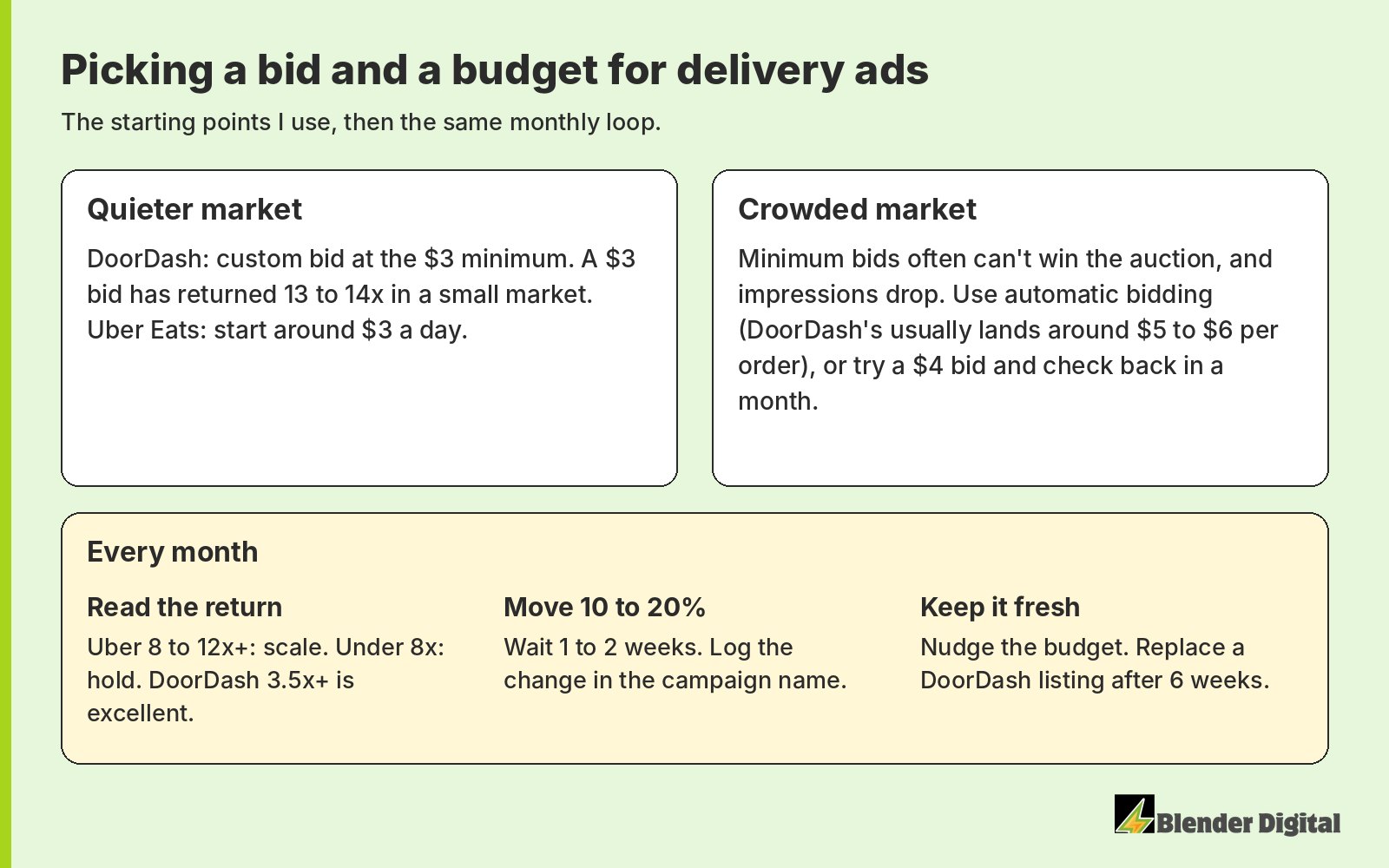
Nothing on that page is a rule the apps enforce. It's what has worked across the stores we manage, and every market is a little different, so treat each change as a test.
How does Blender manage ad budgets and bids?
We pick manual or automatic bidding by market, keep one sponsored listing per store, pair ads with a live offer, and check spend, impressions and return every week. Budgets move in small steps with the change logged, listings get refreshed before they go stale, and credits get paced so none expire unused. That's part of our campaign management, and the choice of what each ad dollar should buy (a new customer or one more order) is set in campaign strategy.
At that Long Island taco shop, the Uber Eats ad return went from 5.92x in August to 8.92x in September 2026, and the DoorDash sponsored listing went from $4.29 to $5.63 in sales per $1. Uber's number counts any order from a customer who saw the ad, so I read it as Uber's attributed return and don't add it on top of the other sales.
If your ad settings haven't been touched in months, Blender's here to help. Book a free 30-minute call and we'll go through your bids and budgets with you.
FAQ
What is the minimum bid for a DoorDash sponsored listing?
$3 per order. DoorDash usually suggests $5, and automatic bidding tends to land around $5 to $6 per order in my experience.
Should I use automatic or manual bidding on DoorDash?
In a quieter market, a manual bid at the $3 minimum can work well. In a crowded market, the minimum often can't win the auction, so automatic bidding usually keeps you visible.
How much should I spend on Uber Eats ads per day?
Start around $3 a day. Raise it 10 to 20% at a time when the return is 8 to 12x or better, hold under 8x, and stop adding money around 6x.
Why isn't my sponsored listing spending its budget?
Usually the bid is too low to win the auction in your market. Try automatic bidding, or raise a manual bid by a dollar and check back in a month.
How often should I change my delivery ad budget?
Wait 1 to 2 weeks between changes and move 10 to 20% at a time. Nudge sponsored listing budgets monthly so they don't go stale.