
Are you struggling to get more than a handful of Grubhub orders a week? Wondering why a pickup order cost you 15%? Waiting on a deposit that never showed up? Emailing an account advisor who never writes back?
Grubhub is the app I hear the most quiet frustration about. "It looks like it's a website from the 90s… The algorithm makes no sense." That's my honest take too. But on one account, a single escalation email turned up $457.79 in payouts nobody knew were missing. So it's worth an hour a month, even if it's not worth much more than that.
Here's why Grubhub feels the way it does, how to fix the five problems I see most, and when it makes sense to pause a brand.
Quick answers and quick fixes
- Money missing? Log in as an admin at restaurant.grubhub.com, then Settings, then Payment. Make sure direct deposit is actually set up.
- Orders low? Normal. Grubhub is about 5 to 10% of the market in most places I work.
- Paying 15% on pickup? On the Plus plan the marketing fee applies to pickup too. Check which plan you're on.
- Rep not answering? Email restaurants@grubhub.com with your store ID, and copy that address on emails to your rep.
- Not sure about promos? Start with Grubhub's loyalty and one small offer, like $3 to $4 off $20.
- Brand getting no orders? Pause it. Don't delete it.
Why are my Grubhub orders so low?
Because Grubhub is a small slice of delivery. In most markets I work in it's about 5 to 10%, behind DoorDash and Uber Eats. At a taco shop on Long Island, Grubhub did $1,275 of the store's $9,463 in delivery sales in September 2026. That's a real number, and it's still the smallest of the three apps.
So I tell owners there's no point over-optimizing for Grubhub. Keep it on as a market play, make sure the basics are right, and put your effort into the two big apps. If you're not on Grubhub yet, I cover when it's worth adding in when to add another delivery app.
The basics, in order:
- Compare full months. Pull sales for each app for the same calendar month. If Grubhub is in the 5 to 10% range, it's behaving normally.
- Check your hours and menu match the other apps. Missing items or wrong hours cost you orders on any app.
- Add photos. Grubhub uses square images. The sizes for every app are in image sizes and photo rules.
- Don't copy your DoorDash playbook. Grubhub ranks stores its own way. More on that in the promotions section below.
What is Grubhub actually charging me?
Grubhub splits its fee in two. The marketing commission is 5% on Basic, 15% on Plus and 20% on All-access. If Grubhub drivers deliver your orders, delivery fees start at 10% on top, and payment processing is extra (Grubhub Marketplace page, checked October 2026).
The one that surprises people is pickup. On the plans I've seen, the marketing fee applies to pickup orders too, so a Plus store pays 15% on a pickup order. DoorDash and Uber Eats charge about 6 to 7% on pickup. If a lot of your Grubhub orders are pickup, ask whether a different plan fits better. For every plan on all three apps side by side, see how much the delivery apps charge.
Here's the part owners don't expect. Because most stores don't promote much on Grubhub, it can pay out well per dollar. In September 2026 the Long Island taco shop's payout ratio on Grubhub was 82.5%, against 60.6% on Uber Eats and 57.5% on DoorDash, where the new-customer offers were running. Work out your own: Grubhub payout divided by Grubhub sales, for one full month.
Why hasn't Grubhub paid me?
Most of the time, direct deposit was never finished. That's what happened with the $996. Here's how to check and fix it, per Grubhub's help center:
- Log in at restaurant.grubhub.com with an administrator account. Basic users can't see financials.
- Click Settings in the left menu, then Payment.
- Make sure a W-9 is on file for each location. It asks for the business name, entity type, tax address and EIN or SSN.
- Click Set up direct deposit. Pick how often you want to be paid, and whether you want one deposit for all locations or one per store.
- Connect your bank through Plaid, choose the account and click Submit. Grubhub says some banks take 1 to 2 business days to confirm.
If deposit is set up and money still looks short, compare your Grubhub statement against your bank for a full month. My guide to reading delivery statements covers how pay periods can straddle two months. Then email support with the store ID, the dates and the amounts you think are missing. That's how the $457.79 turned up.
How do I get a Grubhub rep to reply?
Grubhub account advisors can go quiet for weeks. One went on leave and her auto-reply just pointed to the general support inbox. Here's what works for me (the DoorDash and Uber Eats version is in what to do when you can't reach your rep):
- Email restaurants@grubhub.com. It's the support address Grubhub prints on its own report emails, next to the phone number 877-799-0790. An email there gets a request number, so you have something to point to.
- Copy restaurants@grubhub.com on emails to your advisor. A client showed me this one. It opens a case even when the advisor ignores the email.
- If you still hear nothing, escalate in writing. Keep it short and factual, like the template below.
Subject: Store ID [number]: no response since [date]
Hi [name], I've reached out on [dates] by email and phone about [issue] and haven't heard back. An unresponsive account is a real cost to us, and it makes Grubhub harder to prioritize. Could you please:
- Assign us an advisor who can respond, or confirm you're still our contact.
- Send a case number for [issue].
- Tell us when we can expect an answer.
If you can't help with this, please route it to your manager. Thanks, [name]
When I sent a version of that, the rep replied within 5 days. A plainer line also works: telling a rep that poor campaign performance may lead you to remove the store from Grubhub got a reply the next day. Only say it if you mean it.
Should I run Grubhub promotions or rely on loyalty?
Start with loyalty and one small offer. What I've seen work on Grubhub is $3 to $4 off a $20 order, plus the built-in loyalty program. On some accounts the advisor has to switch loyalty and promotions on for you, so ask.
Be careful with heavier campaigns. At one client, running campaigns on Grubhub actually cut organic traffic, because the algorithm started ranking the store against other stores running campaigns. And they can get expensive fast. In September 2026 at an Asian QSR in Maryland, promotions cost 39% of Grubhub sales.
How I'd test it yourself:
- Note your Grubhub sales, orders and payout ratio for the last full month.
- Turn on loyalty and a single threshold offer. Nothing else.
- Leave it for a full month.
- If orders didn't move and the payout ratio dropped, turn the offer off and keep loyalty. If orders grew and the payout ratio held up, keep it.
Keep offers at or under about a 25% effective discount. Anything richer belongs on the bigger apps, where the same money reaches more people.
When should I pause a brand on Grubhub?
If you run several brands out of one kitchen, Grubhub is where the dead weight shows. A historic diner in San Francisco that we manage has 7 brands on Grubhub, and together they did $1,046 in September 2026. Think of it as one anchor brand that pays the bills, with smaller brands adding on top.
My rules:
- Pause brands with zero orders. They add tablet noise and menu upkeep for nothing.
- Pause, don't delete. If your brands run through middleware like Otter, pause the brand there instead of deleting it. You can switch it back on later without rebuilding the menu.
- Pause when the kitchen is stretched. If the busy brands on the big apps need the line, the Grubhub-only brands go first.
- Don't quit Grubhub over fees alone. Ask about the plan first. I've watched an owner switch off a whole app in his most profitable month on it.
Example: what does Grubhub look like next to the big apps?
Here's one full month at the taco shop on Long Island, straight from its September 2026 report.
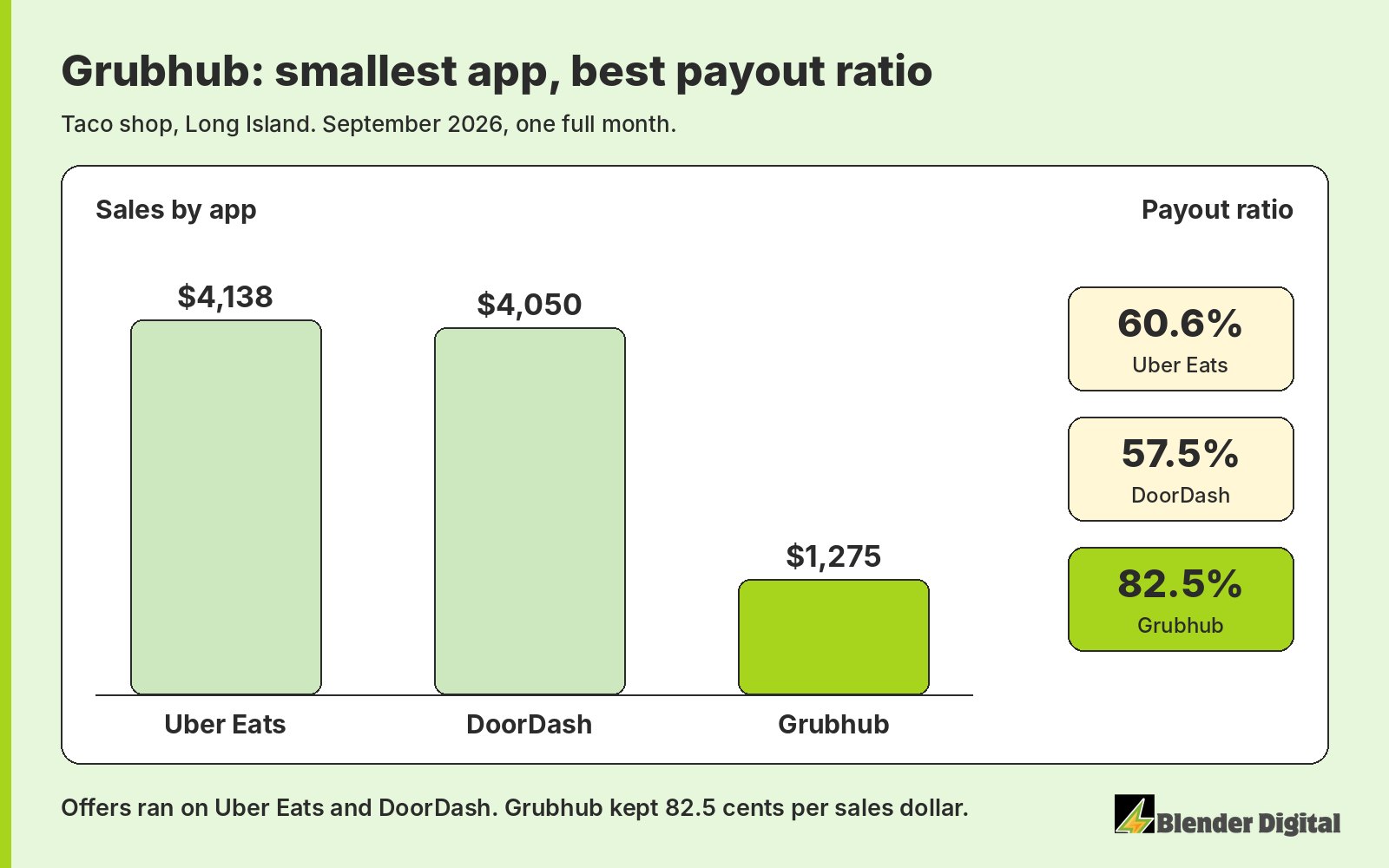
Grubhub brought in the least, but it kept the most of each dollar because the growth offers were running on the other two apps. That's the role I want Grubhub to play: steady, cheap, and not much of my time.
How does Blender handle Grubhub for clients?
We keep it simple. Every store gets its own Grubhub admin login, because Grubhub only allows one email per account. We check that deposits are landing, read Grubhub's weekly order reports, keep one small offer and loyalty running, and escalate in writing when a rep goes quiet. Payouts and payout ratio for each app show up in the monthly report from our reporting and dashboards work, and offers and reps fall under campaign management.
At the taco shop on Long Island, Grubhub grew from $788 in August to $1,275 in September 2026, up 61.8%, and its payout ratio went from 80.8% to 82.5%. That was our first managed month, and most of our time went to Uber Eats and DoorDash. Grubhub just needed to be set up right and watched.
If Grubhub is a black box for you, or you suspect money is missing, send me your last full month from each app. Blender's here to help. Book a free 30-minute call and we'll go through it together.
FAQ
Is Grubhub worth it for restaurants?
As a third app, usually yes. It's about 5 to 10% of delivery in most markets I work in, so keep it simple: loyalty, one small offer, and a monthly check that payouts are landing. It can pay out more per dollar than the bigger apps because you promote less there.
How much does Grubhub charge restaurants?
Grubhub's marketing commission is 5% on Basic, 15% on Plus and 20% on All-access. Delivery by Grubhub drivers starts at 10% on top, and payment processing is extra. On the plans I've seen, the marketing fee also applies to pickup orders.
Why hasn't Grubhub paid me?
Most often direct deposit was never finished. Log in as an admin at restaurant.grubhub.com, go to Settings, then Payment, check the W-9 and set up direct deposit. If money still looks short, email support with your store ID, dates and amounts.
How do I contact Grubhub restaurant support?
Email restaurants@grubhub.com, the address Grubhub prints on its report emails, or call 877-799-0790. Copy restaurants@grubhub.com on emails to your account advisor so the request is logged even if the advisor doesn't reply.
Should I run promotions on Grubhub?
Start small. $3 to $4 off a $20 order plus Grubhub's loyalty is what I've seen work. Heavier campaigns can get expensive and, at one client, cut organic traffic. Test one offer for a full month and keep it only if orders grow and the payout ratio holds.